AWSS3 Source
AWSS3 Source Setup
Add / Update AWSS3 as Source. Use this option to connect to S3 or S3-compatible cloud services.
Our AWSS3 option provides functionality to make requests, securely upload and download data using Amazon Simple Storage Service (S3) and compatible services. In S3 storages individual data objects are contained in buckets. Connection is established using the HTTP protocol. By default, secure connection is established. If you don't need a secure connection, please disable the SSL option. To authenticate to S3 storage, you need to provide Access Key and key ID pair.
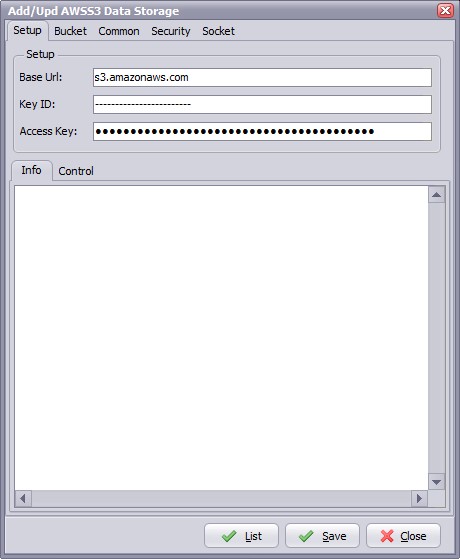
- Base Url: Specify the base URL of the S3 service responder.
- Key ID: Use this option to specify the Key ID provided to the user of Amazon data storage. The KeyID and Access Key pair is used to authenticate and communicate with data storage.
- Access Key: Use this option to specify the secret key that was issued by Amazon to the data storage user. The KeyID and Access Key pair is used to authenticate and communicate with data storage.
Bucket Options
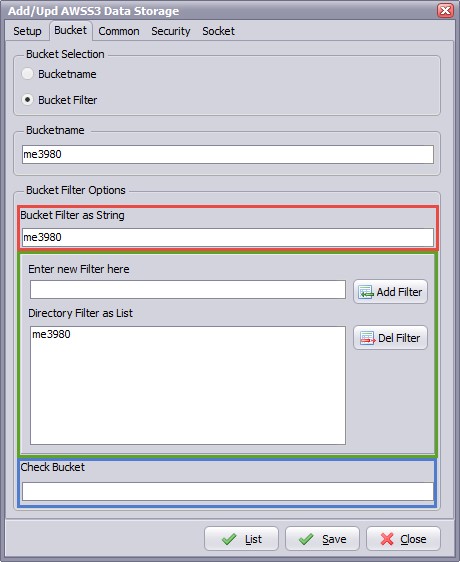
- Bucket Selection:
- Bucketname: Enter the Bucketname you want to download your files from.
- Bucket Filter: Search for Buckets using a filter.
Bucket filters can be added in two ways:
- Adding filters directly (red marked box). Separate each filter with a ';'
- Using the Add/Del Filter option. Enter a new filter and click the < Add Filter > button. Filters can also update or delete filters.
In both cases the result will be visible in the 'Bucket Filter as List' field.
- Check Bucket: Check you filter using this test field.
Common Options
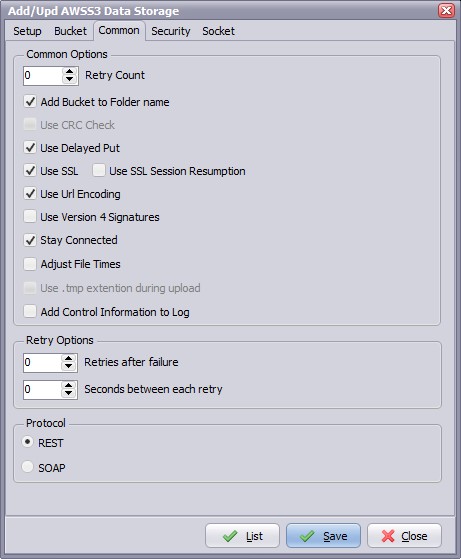
- Retry Count:
- Add Bucket to Folder name:
- Use Crc Check: Specifies if CRC check should be performed.
- Use Delayed Put: Specifies if PUT requests should be delayed.
- Use SSL: Specifies if secure connection should be established.
- Use SSL Session Resumption: Session reuse is one of the most important mechanism to improve SSL performance.
- Use Url Encoding: Specifies if URL encoding should be used.
- Use Version 4 Signatures:
- Stay Connected: Don't disconnect between scans.
- Adjust File Times: File times will be adjusted after upload/download operation.
- Add Control Information to Log: Add AWSS3 specific control information to the log.
- Retries after failure: Amount of retries after a copy/move failure.
- Seconds between each retry: Seconds that the rule will wait between each retry.
- Protocol: Use this option to specify the protocol which should be used to access the data storage.
Security Options
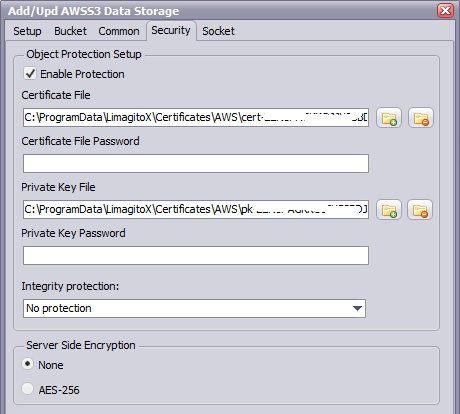
- Certificate File: This file should contain the certificate (X.509). It recognizes the format automatically. If the format is not recognized, an error is reported. The supported formats are DER, PEM, PFX, SPC.
- Certificate File Password: Password to access the Certificate File.
- Private Key File: This files should contain the certificate's private key (X.509). It will recognizes the format automatically. If the format is not recognized, an error is reported. The supported formats are: DER, PEM, PFX, PVK, NET, PKCS#8.
- Private Key Password: Password to access the Private Key file.
- Integrity Protection:
- No = no authentication info
- Basic = basic authentication info should be used if there is no need to access particular blocks of data objects
- Extended = extended authentication info should be used if there is need to access particular blocks of data objects
- Server Side Encryption: Server-side encryption is about protecting data at rest. Server-side encryption with Amazon S3-managed encryption keys (SSE-S3) employs strong multi-factor encryption. Amazon S3 encrypts each object with a unique key. As an additional safeguard, it encrypts the key itself with a master key that it regularly rotates. Amazon S3 server-side encryption uses one of the strongest block ciphers available, 256-bit Advanced Encryption Standard (AES-256), to encrypt your data.
Socket Options
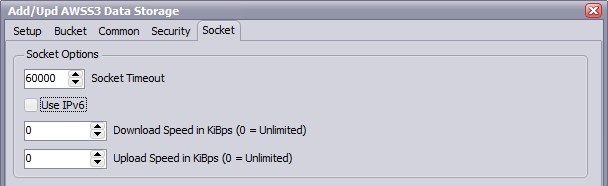
- Socket Timeout: Specifies maximum time of inactivity after which socket operation is canceled and is considered as expired. If you try to connect, read or write something from/to socket and the attempt is unsuccessful for specified number of milliseconds the operation is canceled with timeout error.
- Use IPv6: This option defines whether IP protocol version 6 should be used.
- Download Speed: Use this option to specify the maximum number of KiBps that we may receive. The value of 0 (zero) means "no limitation".
- Upload Speed: Use this option to specify the maximum number of KiBps that we may send. The value of 0 (zero) means "no limitation".
Copyright © 2007-2016, www.limagito.com