
Q: We are using LimagiTO File Mover’s custom logging feature to feed a Zabbix monitoring system. We currently use the following log format:
- THREADID changes between runs, which is useful, but we observed that a single rule execution can sometimes involve multiple threads (different THREADIDs writing log entries for the same run).
- DATETIME can span several
seconds or minutes for a single execution, so timestamp alone is not sufficient. - There is no unique execution/run identifier in the available logging tags.
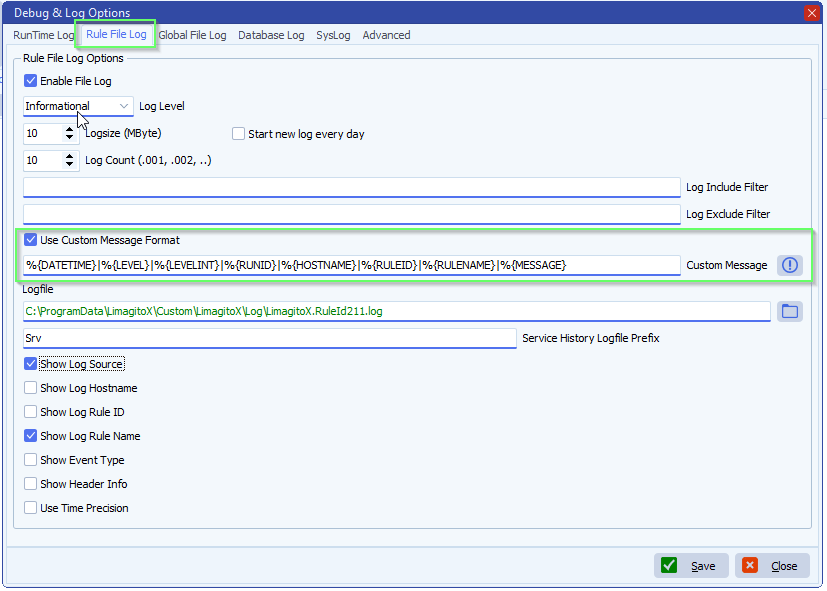
Tags:
********************************************************************************
*** Information about the Limagito File Mover Logging Tag(s) ***
********************************************************************************
The following predefined variables can be used to produce a custom message output format:
APPNAME : Customizable variable (by default set as filename without extension)
APPVERSION : Application file version
APPPATH : Application run path
CPUCORES : Number of CPU cores
DATETIME : Date & time log item occurs
ENVIRONMENT : Customizable variable (normally Production, Test, etc)
DATE : Date log item occurs
HOSTNAME : Computer name
LEVEL : Level or Eventype
LEVELINT : Level as numeric
LOGSOURCE : Description of log source
MESSAGE : Message sent to logger
OSVERSION : OS version
PLATFORM : Customizable variable (normally Desktop, Mobile, etc)
RULEID : RuleID number
RULENAME : RuleName
RUNID : Unique identifier to each rule execution cycle
THREADID : Thread ID log item set
TIME : Time log item occurs
USERNAME : Logged user name
If you need any help about this ‘feed a Zabbix monitoring system’ question, please let us know.
Best Regards,
Limagito Team
#zabbix #managedfiletransfer #filetransfer #filemanagement
