Rename

  • 09 Aug

    How to receive email notifications of renamed filenames

    Receive email notifications

    Q: Can you please tell me if this destination file name parameter is now working in your new version? I want to receive email notifications with the file names that are placed in the destination. For example, the source file name is test.txt, and I have a renaming rule to rename file to text_202511212025.txt (Adding the date of the file move). And I want to see the renamed file name in the email. Long time ago, you guys showed me how to add the whole logging history in the email using Pascal script, but I forgot what to do.
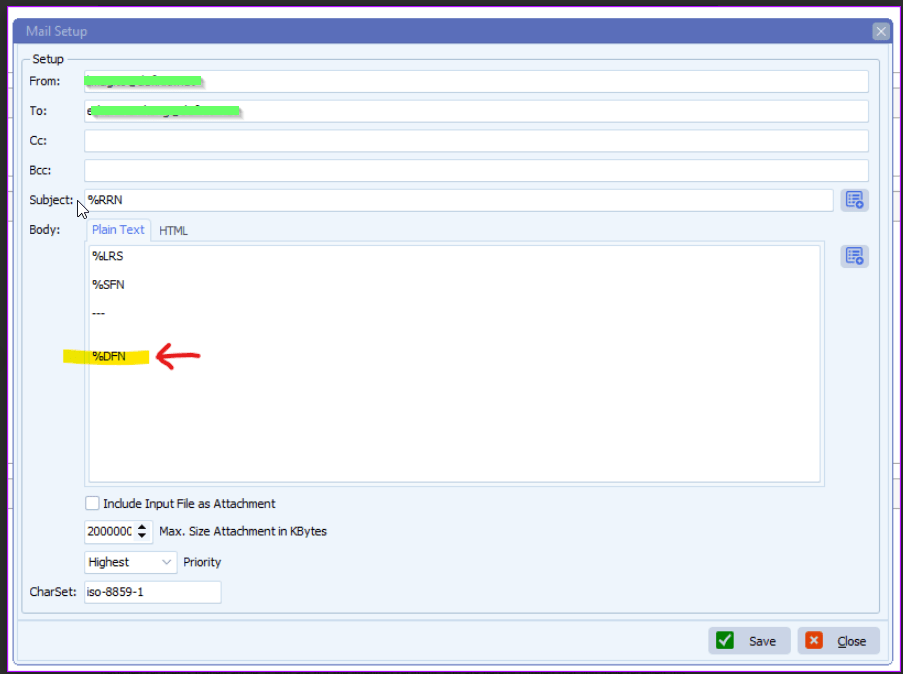
    limagito filemover email setup

    A: Not all parameters are available at each step of the scan flow.
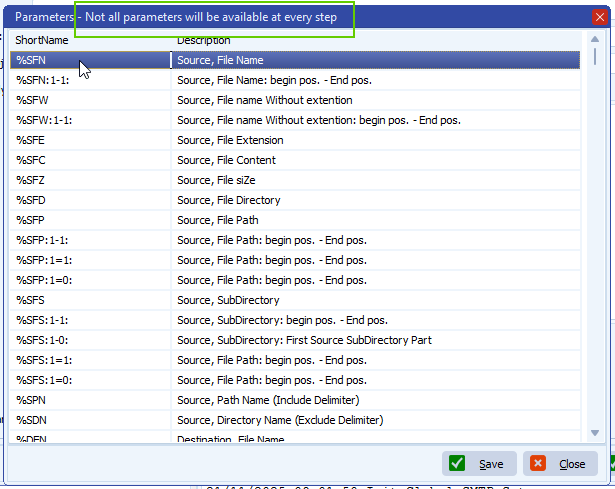
    limagito filemover parameter options

    Please check the following information on how we did this:

    – Moving Rule Menu item > Pascal Script option
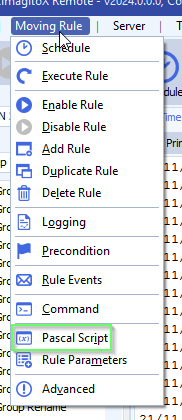
    limagito filemover pascal script option

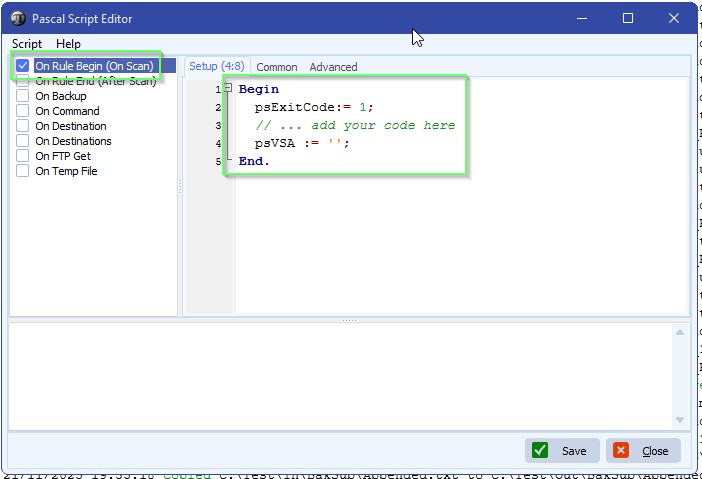
    – Enable ‘On Rule Begin’ script and add:  psVSA := ”;
    We’ll use psVSA (parameter Var String A) as a container for the renamed file names sent to the Destination. This psVSA will be used in the email setup.

    limagito filemover Pascal script

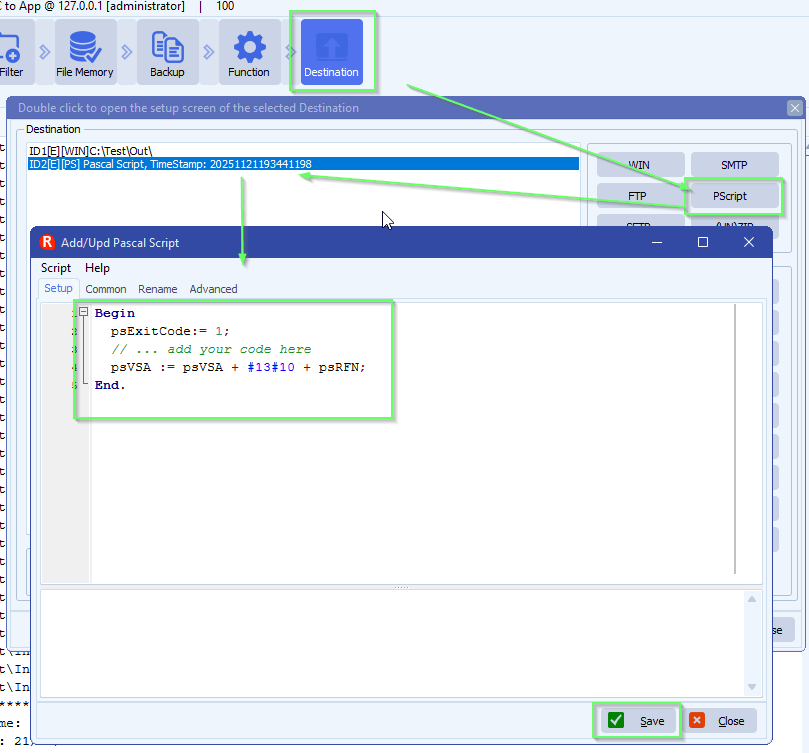
    – Add an extra PScript as Destination:
    We used psRFN here  = Renamed File (destination) Name
    limagito filemover pascal script as destination setup
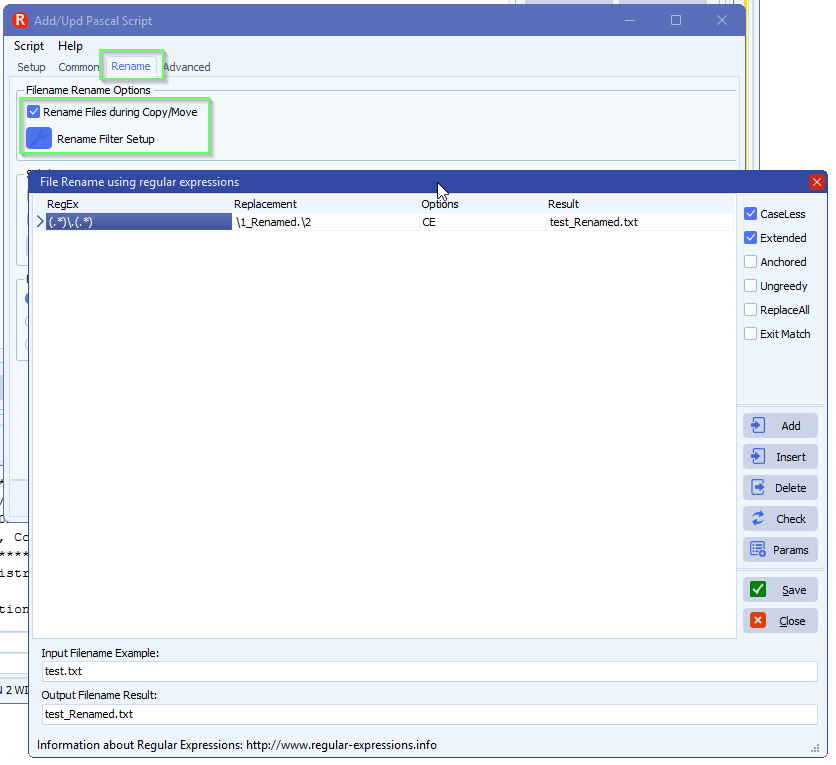
    – Important is to set the Renaming the same as you did previously in the existing Destination. We need this because of the information that will appear in the email.
    limagito file mover renaming setup
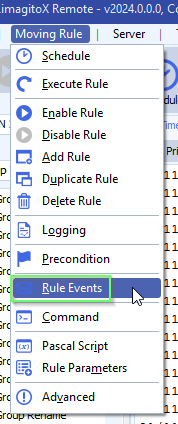
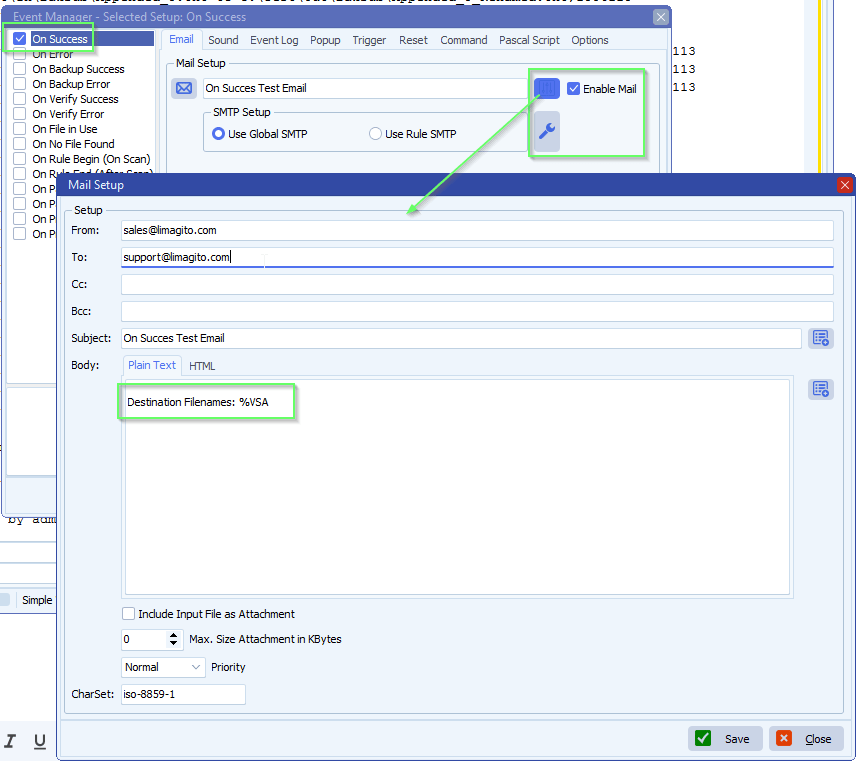
    – Then use psVSA in your email event:
    limagito filemover rule events option
    – %VSA will use the data from the added PScript Destination
    limagito filemover email setup
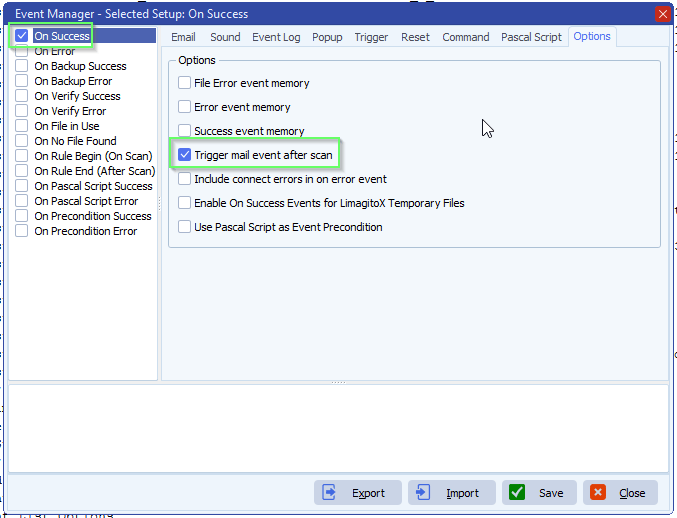
    – We enabled ‘Trigger mail event after scan’ because we only need a single email to be send after the scanning is done.
    limagito filemover rule events options

    If you need any help about this ‘receive email notificationsl’ question, please let us know.

    Best Regards,

    Limagito Team

    #managedfiletransfer #filetransfer #filemanagement #limagito
    By Limagito-Team Email Rename ,
  • 16 Jan

    How to get week number from filename

    Week number from filename

    Q: I have tried to look at your blog and pascal scripts, but have not found what I am looking for, so maybe you could help.

    I would like to rename files with filename starting with a date to year and two digit week number.
    Example: 18-01-2026-different-names-etc.pdf
    New filename: 202603-different-names-etc.pdf

    A: This is possible using our scriptin option

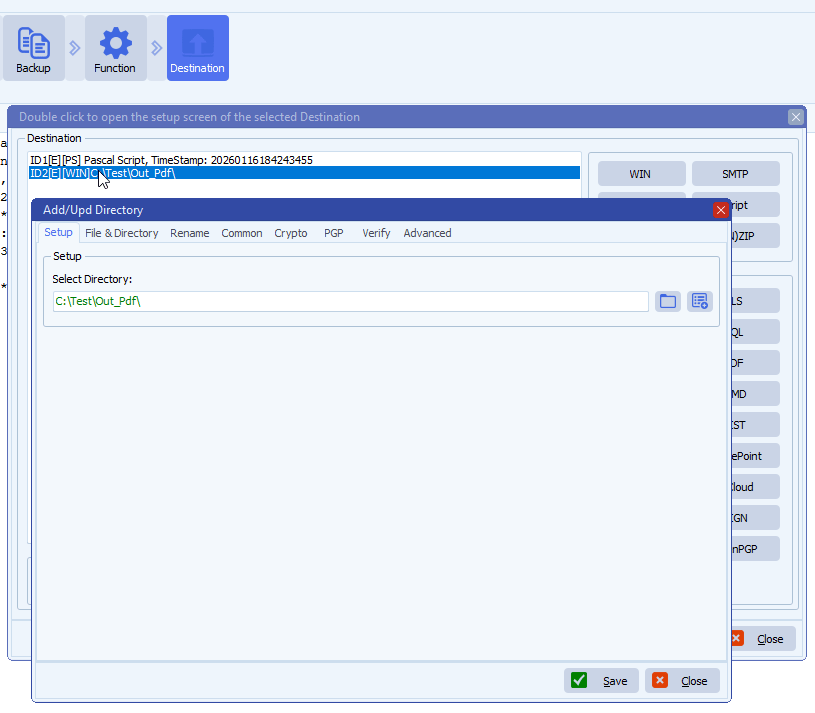
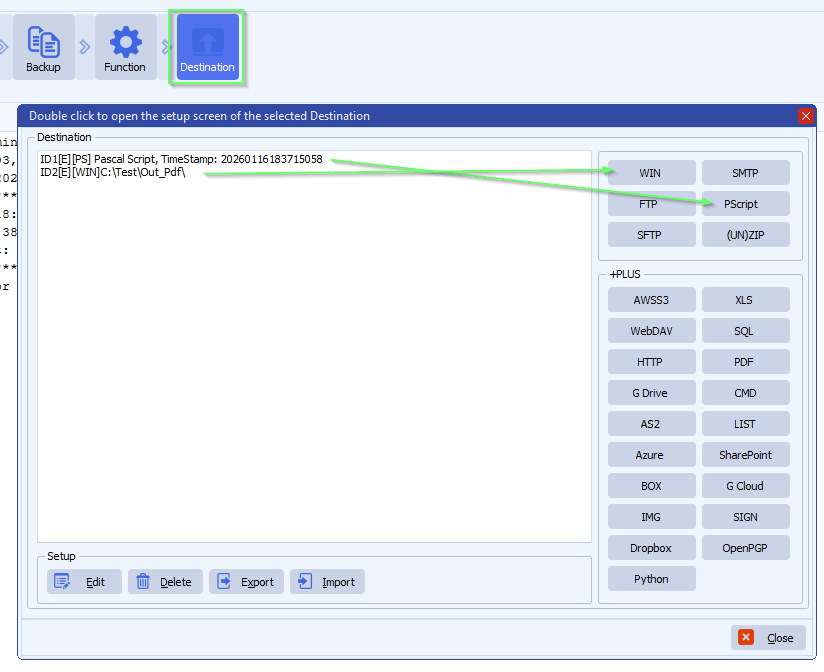
    • Destination Setup, you need an extra Destination:
      • First Destination must be our Pascal Script
      • Second Destination will be your output

    limagito file mover destination setup

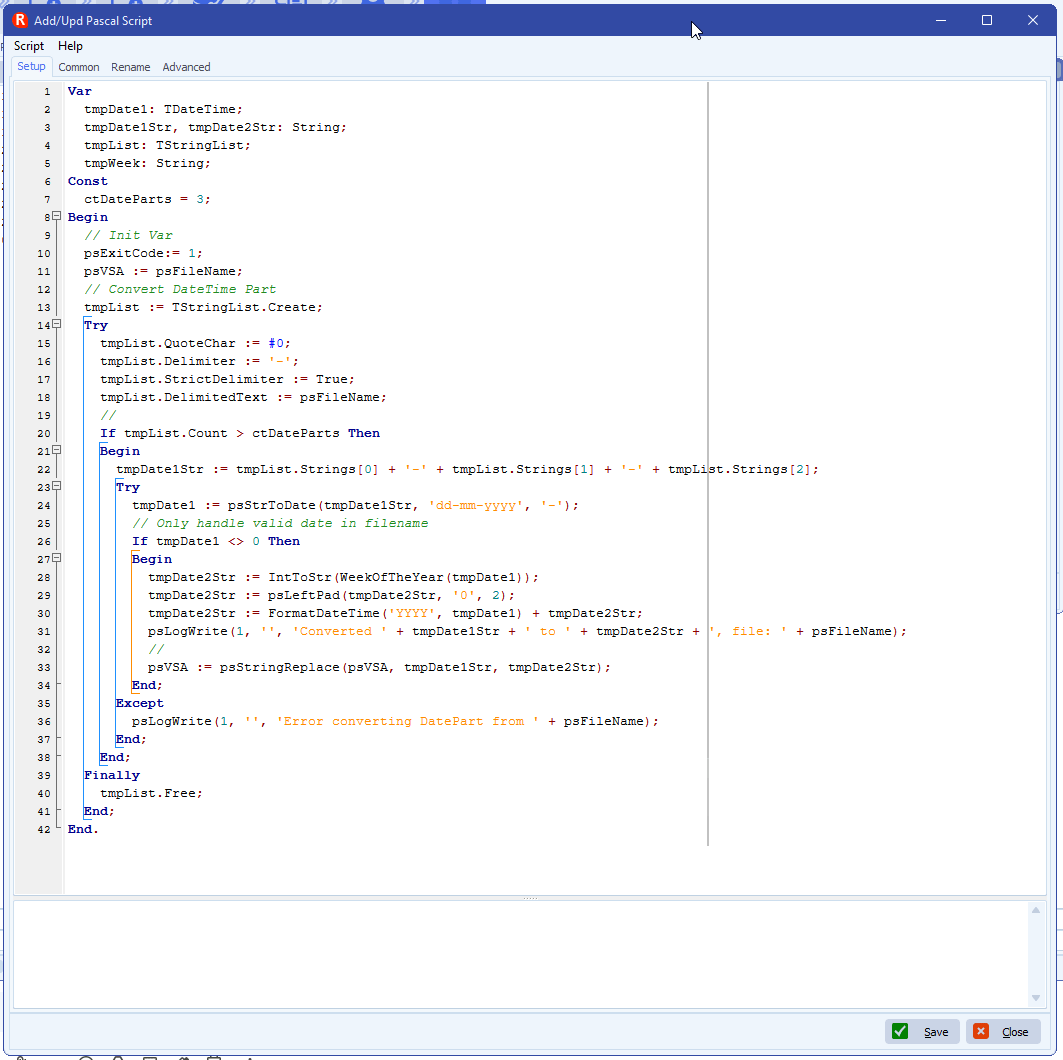
    • Add the following Pascal Script in the First Destination, script: link

    limagito file mover week number from filename

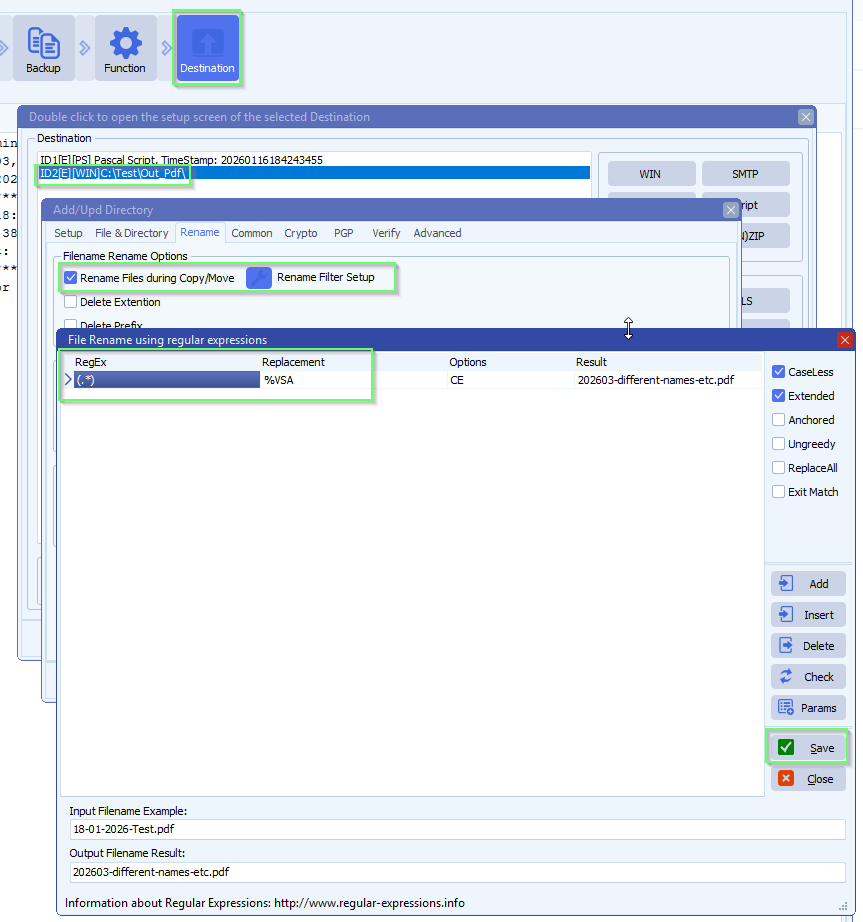
    • Enable and add the following File renaming setup in the Second Destination (= your output directory):

    limagito file mover windows folder as destinationlimagito file mover file renaming setup

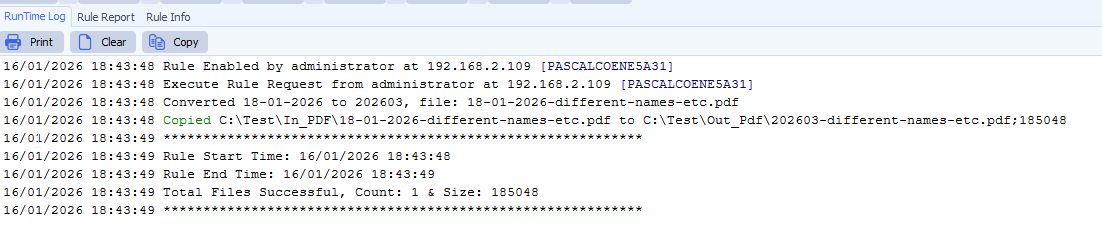
    • RunTime Log Result:

    limagito file mover runtime log result

    If you need any help about this ‘week number from filename’ question, please let us know.

    Best Regards,

    Limagito Team

    #basic #managedfiletransfer #filetransfer #filemanagement

    By Limagito-Team Pascal Script Rename
  • 12 Nov

    Regular expressions reference guide

    Regular expressions reference guide

    ANCHORS

    ^         Match the start of a string
    $         Match the end of a string
    \b        Match a word boundary
    \B        Match a non-word boundary

    ANCHORS Examples

    ^Hello    Matches "Hello world" but not "Say Hello"
    world$    Matches "Hello world" but not "world peace"
    \bcat\b   Matches "cat" in "the cat sat" but not in "category"
    \Bcat     Matches "cat" in "category" but not in "the cat"
    \bcat     Matches "cat" at word start: "cat" and "category"
    cat\b     Matches "cat" at word end: "cat" and "tomcat"

    CHARACTER SETS

    [xyz]     Match any of x, y or z
    [^xyz]    Match anything except x, y or z
    [0-9]     Match any digit
    [a-z]     Match any lowercase letter

    CHARACTER SETS Examples

    [aeiou]   Matches any vowel
    [^aeiou]  Matches any consonant (non-vowel)
    [0-9]     Matches "5" in "Hello5"
    [a-zA-Z]  Matches any letter (upper or lower)
    [a-z0-9]  Matches any lowercase letter or digit
    gr[ae]y   Matches both "gray" and "grey"
    [^0-9]    Matches any non-digit character

    ESCAPE CHARACTERS

    \.        Matches a literal period/dot character
    \d        Matches any digit (0-9)
    \s        Matches any whitespace (space, tab, newline)
    \w        Matches any word character (a-z, A-Z, 0-9, _)
    \D        Matches any non-digit
    \S        Matches any non-whitespace
    \W        Matches any non-word character

    ESCAPE CHARACTERS Examples

    192\.168\.1\.1   Matches IP address (dots are literal)
    \d{3}            Matches "123" in "Room 123"
    Hello\sWorld     Matches "Hello World" or "Hello World"
    \w+              Matches "hello", "test123", "my_var"
    \d+\.\d+         Matches decimal numbers like "3.14" or "99.99"
    \w+@\w+\.\w+     Matches simple email pattern

    FLAGS / MODIFIERS

    i         Case-insensitive matching
    g         Global match (find all matches)
    m         Multiline mode (^ and $ match line breaks)
    s         Dotall mode (. matches newline)

    FLAGS / MODIFIERS Examples

    Case-insensitive (i):
    /hello/ Matches only “hello”
    /hello/i Matches “hello”, “Hello”, “HELLO”, “HeLLo”

    Global (g):
    /cat/ Matches first “cat” in “cat and cat”
    /cat/g Matches both “cat” instances

    Multiline (m):
    Text: “Line 1\nLine 2\nLine 3”
    /^Line/ Matches only first “Line”
    /^Line/m Matches all three “Line” at start of each line
    /\d$/m Matches digit at end of each line

    Dotall (s):
    Text: “Hello\nWorld”
    /Hello.World/ No match (. doesn’t match \n)
    /Hello.World/s Matches (. now matches \n)

    Combined flags:
    /test/gi Case-insensitive AND global
    /^start/mi Multiline AND case-insensitive

    GREEDY vs LAZY

    *         Greedy: match as much as possible
    *?        Lazy: match as little as possible
    +         Greedy
    +?        Lazy
    ?         Greedy
    ??        Lazy
    {n,m}     Greedy
    {n,m}?    Lazy

    GROUPS

    (xyz)     Match 'xyz' as group
    (x|y)     Match 'x' or 'y'
    (?=xyz)   Match succeeds only if followed by xyz
    (?!xyz)   Match succeeds only if not followed by xyz

    GROUPS Examples

    (cat|dog)        Matches "cat" or "dog"
    (\d{3})-(\d{4})  Matches "555-1234" (captures area code and number separately)
    (https?://)?     Matches optional "http://" or "https://"
    test(?=ing)      Matches "test" in "testing" but not in "tester"
    test(?!ing)      Matches "test" in "tester" but not in "testing"
    \d+(?=px)        Matches "10" and "20" in "10px 15em 20px"
    \$\d+(?!\.)      Matches "$50" but not "$50.99" (whole dollars only)

    GROUPS References (BACKREFENCES)

    \1        Reference to first captured group
    \2        Reference to second captured group

    SPECIAL CHARACTERS

    \t        Tab character
    \n        Newline
    \r        Carriage return
    \\        Literal backslash
    \*        Literal asterisk
    \+        Literal plus
    \?        Literal question mark

    SPECIAL CHARACTERS Examples

    \t           Matches tab in "Hello\tWorld"
    \n           Matches newline in multi-line text
    Price: \$50  Matches "Price: $50" (literal dollar sign)
    C:\\Users    Matches "C:\Users" (literal backslash)

    QUANTIFIERS

    ?         Match 0 or 1 time (optional)
    *         Match 0 or more times
    +         Match 1 or more times (at least once)
    {n}       Match exactly n times
    {n,}      Match n or more times
    {n,m}     Match between n and m times

    QUANTIFIERS Examples

    a?        Matches "" or "a"
    a*        Matches "", "a", "aa", "aaa", etc.
    a+        Matches "a", "aa", "aaa", etc. (but not empty)
    a{3}      Matches exactly "aaa"
    a{2,}     Matches "aa", "aaa", "aaaa", etc.
    a{2,4}    Matches "aa", "aaa", or "aaaa"

    If you need any help about this ‘Regular expressions reference guide’, please let us know.

    Best Regards,

    Limagito Team

    #regex #managedfiletransfer #filetransfer #filemanagement

    By Limagito-Team Rename ,
1 2 3 4 7
SEARCH