
Using Microsoft Graph API with OneDrive
On request we added support for Microsoft Graph as API method in version v2026.4.14.0.
Limagito FileMover Setup
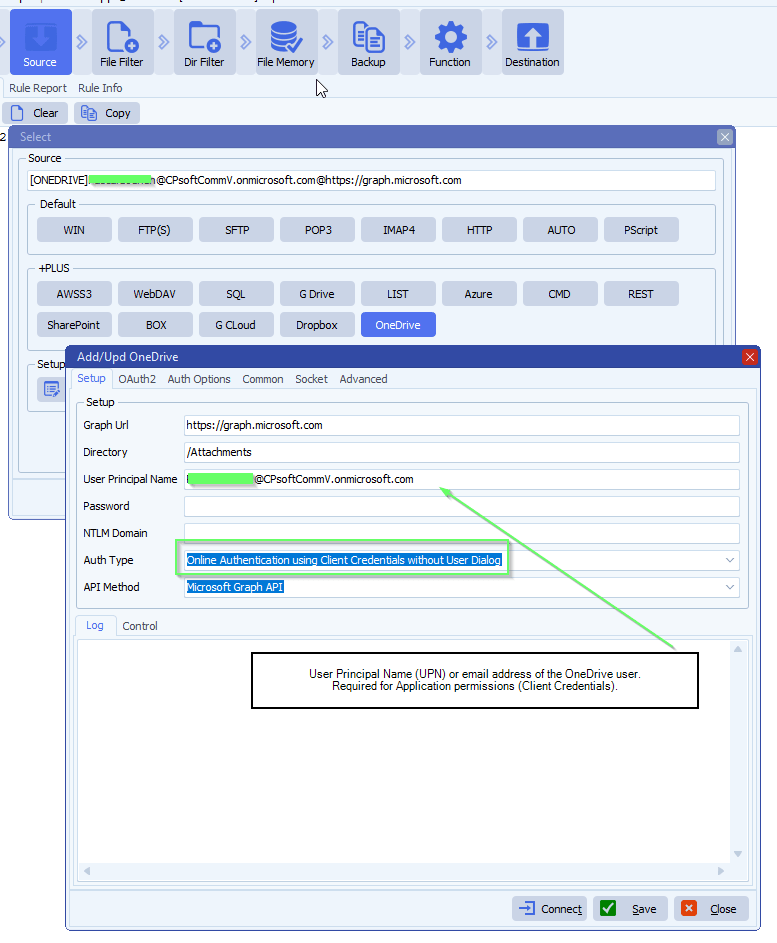
- Setup
- Graph Url is fixed, should be https://graphMicrosoft.com
- Set Directory, in our example: /Attachements
- Select the Auth Type you will be using, check the previous blog articles:
- Online Authentication using Client Credentials without User Dialog
- This means ‘Application permissions’ in your Azure App Registration
- OAuth 2.0 authorization code flow
- This means ‘Delegated permissions’ in your Azure App Registration
- Online Authentication using Client Credentials without User Dialog
- The following example uses ‘Online Authentication using Client Credentials without User Dialog’
- In this case, you need to add the User Principal Name (email address, example: user@contoso.com)
- Do not forget to add Graph Application permissions in your Azure App Registration
- OAuth2 setup:
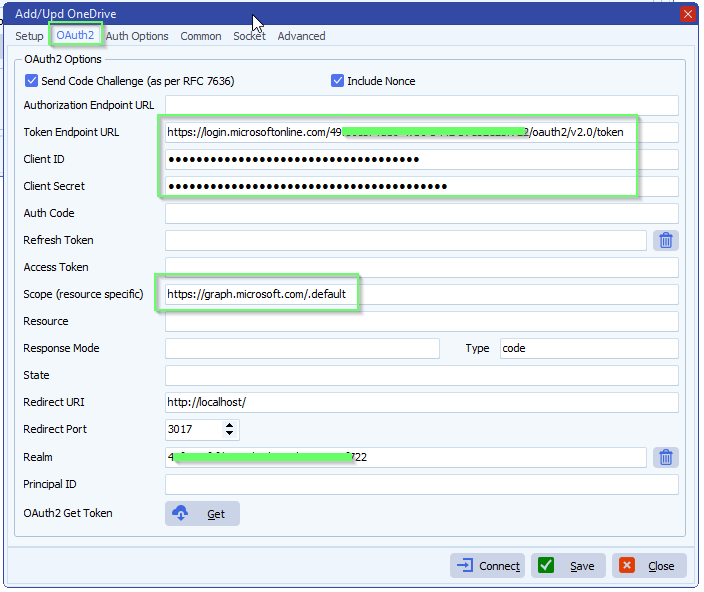
- Enable ‘Code Challenge’
- Enable ‘Include Nonce’
- Leave ‘Authorization Endpoint URL’ empty, not used with ‘Online Authentication using Client Credentials without User Dialog’
- Set ‘Token Endpoint URL’
- https://login.microsoftonline.com/%realm/oauth2/v2.0/token
- %realm will be replaced by the Realm value = Directory (tenant) ID. You can also enter the full URL including the Tenant.
- Enter your Client ID and Client Secret
- Azure > App Registrations > Select the App you created > Use ‘Application (client) ID’ as Client ID in Limagito OneDrive OAuth2 setup
- Azure > Certificates & Secrets > Client secrets > Use ‘Value’ field as Client Secret in Limagito OneDrive OAuth2 setup
- Set ‘Scope’ to: https://graph.microsoft.com/.default
- Don’t forget to add “File.ReadWrite” to the Permissions in your Azure setup.
- Permissions Type must be Delegated with “OAuth 2.0 authorization code flow”
- Permissions Type must be Application with “Online Authentication using Client Credentials without User Dialog”
- FYI: Delegated permissions, also called scopes, allow the application to act on behalf of the signed-in user.
- Don’t forget to add “File.ReadWrite” to the Permissions in your Azure setup.
- Leave Resource empty
- Leave Response Mode empty to omit the default response_mode “query” param.
- Leave Response Type empty, this way the default value “code” will be used.
- Redirect URI is not used with ‘Online Authentication using Client Credentials without User Dialog’
- When using %realm in the ‘Authorization or Token Endpoint URL’
- Please set ‘Realm’ to your Tenant of Tenant_ID
If you need any help about this ‘microsoft Graph API with OneDrive’ option, please let us know.
Best Regards,
Limagito Team
#onedrive #managedfiletransfer #filetransfer #filemanagement #limagito
