News

  • 31 Dec

    As We Close Out 2025

    As We Close Out 2025

    As we approach the end of another remarkable year, we wanted to take a moment to express our heartfelt gratitude to all of you who have made Limagito File Mover an integral part of your file transfer operations.

    It’s been an incredible journey since we first launched Limagito back in 2007. What started as a vision to simplify and automate file transfer processes has evolved into a comprehensive managed file transfer solution, and that evolution has been possible because of you. Your feedback, suggestions, and real-world insights have been the driving force behind every enhancement and new feature we’ve added over these past eighteen years.

    This year has been particularly exciting for us. We’ve expanded our protocol support, enhanced our scripting capabilities, and continued to strengthen the reliability and security features that you depend on for your critical file transfer operations. Each improvement we make is a direct response to the challenges you face and the solutions you’ve helped us envision.

    Looking ahead to 2026, we remain as committed as ever to listening to your needs and pushing the boundaries of what Limagito can do. The landscape of file transfer automation continues to evolve, and we’re excited to evolve right alongside you.

    Thank you for your continued trust, your valuable feedback, and for being part of the Limagito community. Here’s to another year of seamless file transfers and successful automation!

    Wishing you and your teams a wonderful holiday season and a prosperous New Year.

    Warm regards,
    The Limagito Team

    “Don’t hesitate to contact us, anytime, anywhere, any question.”
    By Limagito-Team News
  • 08 Apr

    Rule events on error and on success event memory option

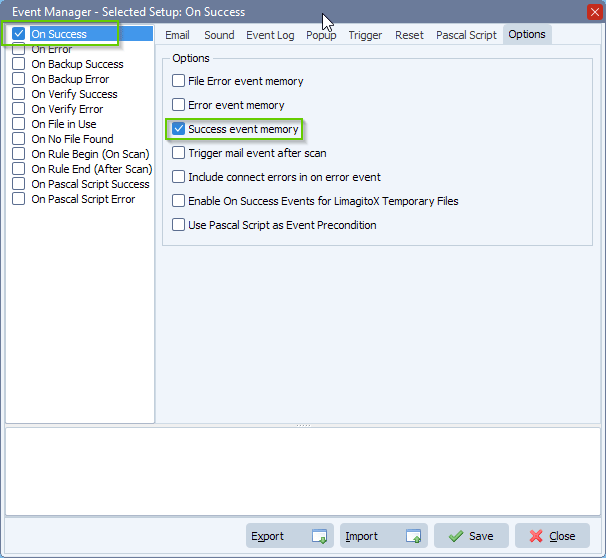
    During a demo we received a question from Arnold if it was possible to trigger a success event only once. This success event memory, as we call it, will be cleared with the next “On error event”. This option was added in version v2023.4.8.0

    Limagito File Mover success event memory

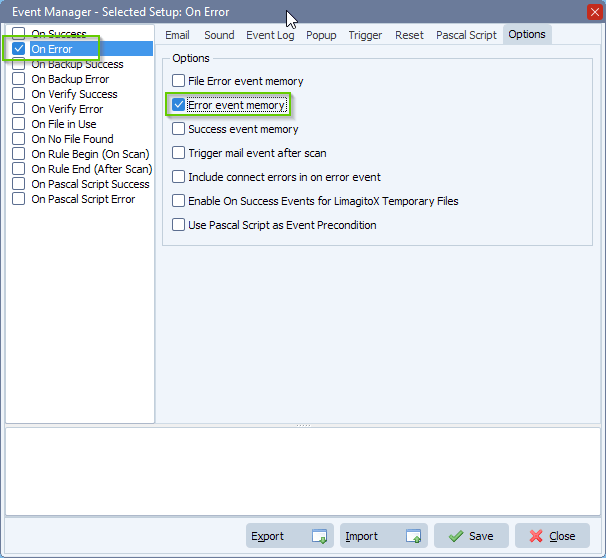
    We already had a kind of “Error event memory” in the previous versions but this one was filename based so we renamed this option to ‘File Error event memory’.  We added a second “Error event memory” where enabled we will only trigger an error event once. This error event memory will be cleared with the next “On success event”.

    Limagito File Mover error event memory

    #FileTransfer

    If you need any info about this  ‘event memory’ option, please let us know.

    Best regards,

    Limagito Team

  • 25 Dec

    File Transfer Management is easy

    File Transfer Management is easy, .. no it isn’t. If somebody tells you it is .. he is lying 🙂

    The following information is just our opinion and you certainly don’t have to agree. We’ll keep adding tips here, feel welcome to add your tips also.

    • Logging
      • Never ever log over the network
        • Ok but .. no, never
      • Always log to a local disk
      • Add a Rule to move older logs if you want to keep them
    • Moving files between processes
      • Let those processes write to a local disk of the system where they are running
      • We prefer SFTP or FTP(S) over Windows shares
        • SFTP and FTP(S) folders are not so visible
        • SFTP and FTP(S) are ‘File Transfer Protocols’
        • No need for network mappings
        • No network mapping issues
        • Security of Windows shares
          • Often set to ‘Everyone Full Control’
        • We prefer SFTP or  FTP(S) Get from a previous process
    • ..

    #FileTransfer

    If you need any info about this ‘File Transfer Management is easy’ post, please let us know.

    Best regards,

    Limagito Team

    By Limagito-Team News
1 2 3 4 10
SEARCH