CSV

  • 17 Feb

    Problem import data from CSV to MSSQL

    Problem import data from CSV to MSSQL

    Q: When I try to import CSV to MSSQL, I have the error because it recognizes the Field “DatabaseId” as a “Date” type. But it must be a String… How can I change this ?

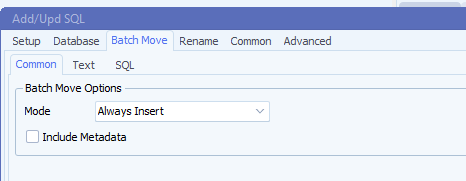
    I also uncheck the checkbox “Include Metadata” in the “Bacth Move” tab. Doesn’t change anything…

    limagito file mover sql as destination

    **************

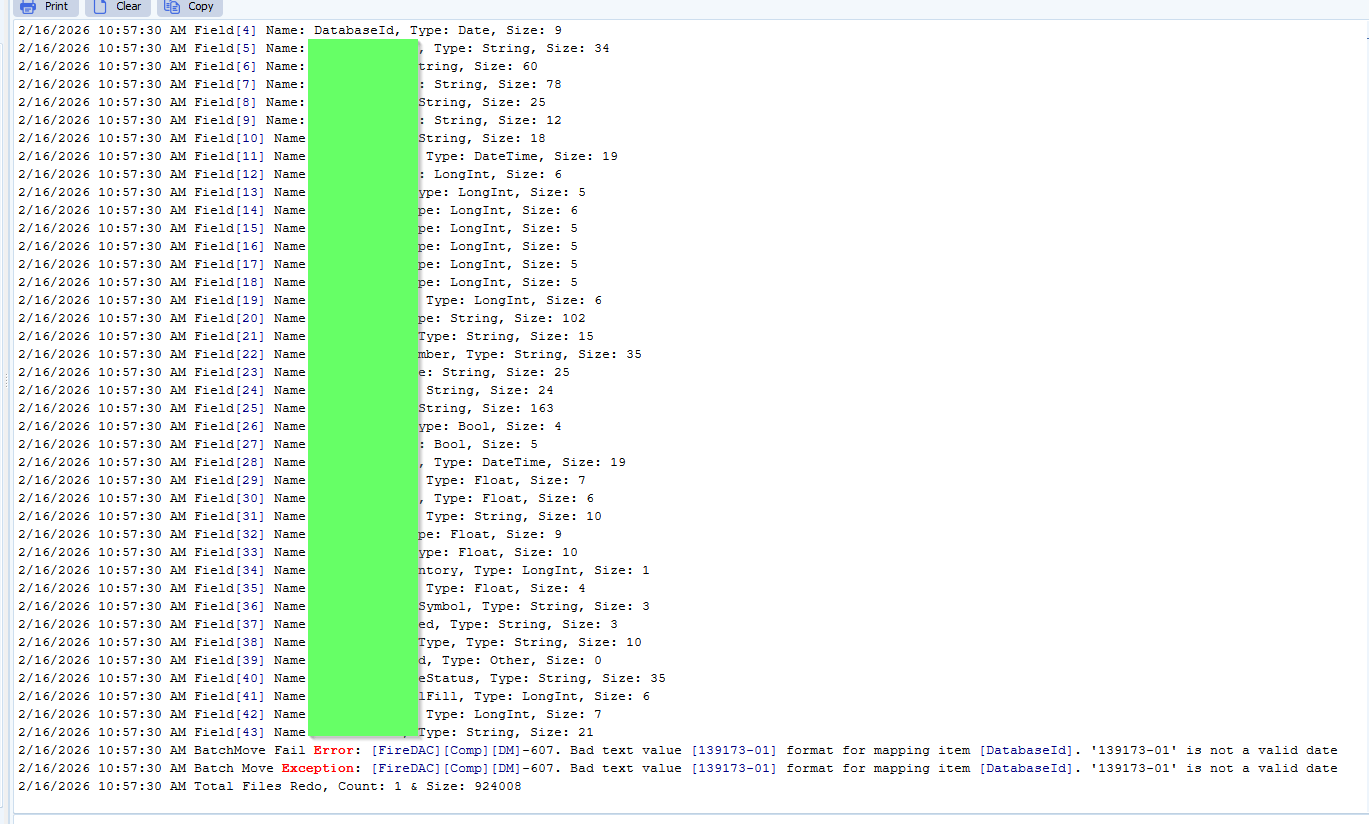
    2/16/2026 10:57:30 AM Field[43] Name: BranchName, Type: String, Size: 21

    2/16/2026 10:57:30 AM BatchMove Fail Error: [FireDAC][Comp][DM]-607. Bad text value [139173-01] format for mapping item [DatabaseId]. ‘139173-01’ is not a valid date

    2/16/2026 10:57:30 AM Batch Move Exception: [FireDAC][Comp][DM]-607. Bad text value [139173-01] format for mapping item [DatabaseId]. ‘139173-01’ is not a valid date

    2/16/2026 10:57:30 AM Total Files Redo, Count: 1 & Size: 924008

    ***********

    limagito file mover Problem import data from CSV

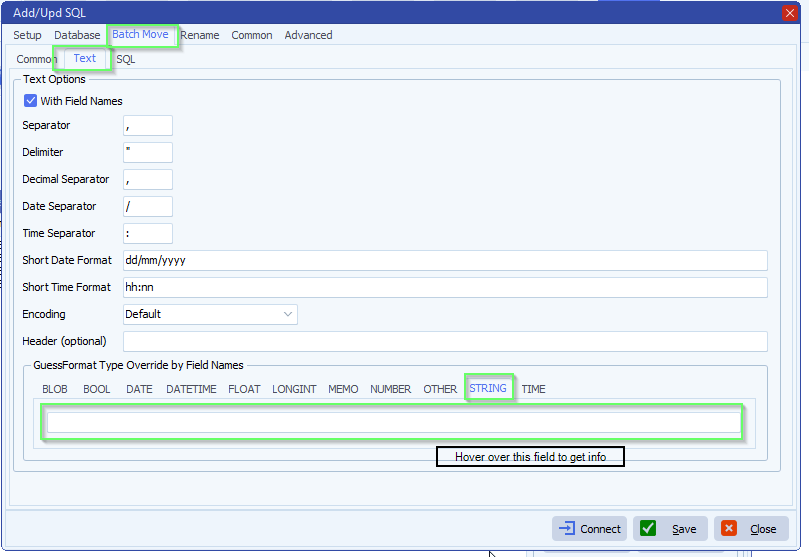
    A: Open your SQL as Destination setup. Default we have an automatic ‘GuessFormat’ option. You can override this, hover over the STRING field to get information.

    limagito file mover Problem import data from CSV

    • Feedback customer

    It works now. Thanks for your support !

    If you need any help about this ‘Problem import data from CSV’ question, please let us know.

    Best Regards,

    Thomas

    #csv #sql #managedfiletransfer #filetransfer #filemanagement

  • 06 Dec

    How to add a record to a csv file

    How to add a record to a csv file

    Q: I have a job which is processed through another bit of software, I get 1 file in and at the end of the process, I can have over 100 data files.

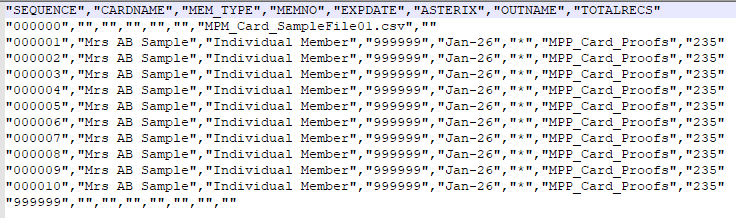
    I need to add a record to the start of each file with the same structure, the fields can be empty but I do need to populate 2 of the fields.

    • Sequence fields needs to be 000000
    • Outname fields needs to be the name of the data file

    I then need to add a record at the end of the file but only 1 field needs to be populated

    • Sequence = 999999

    Is this achievable in Limagito? I can do this within the software that processes the data but it will be a very long process to set up.

    A: This should be possible using our scripting option.

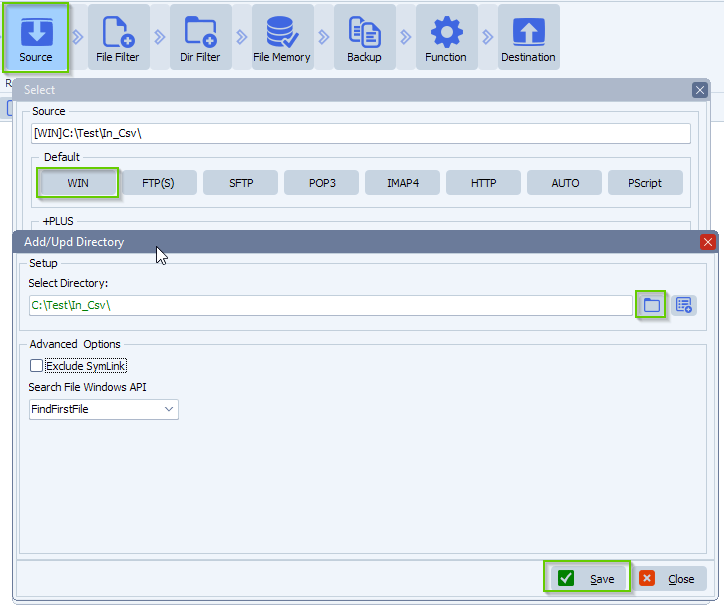
    • We used a Windows folder as Source:

    limagito file mover windows folder as source

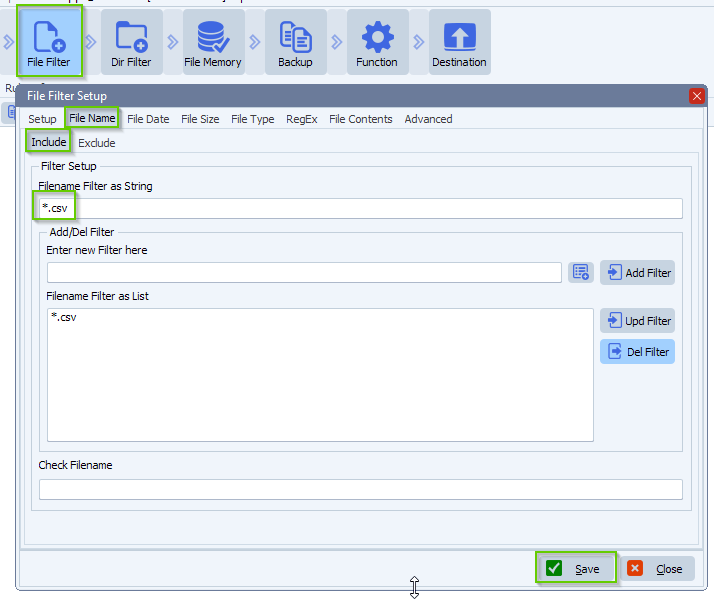
    • We added the following Include Filename filter because we want to be sure we only are going to handle csv files:

    limagito filemover filename filter

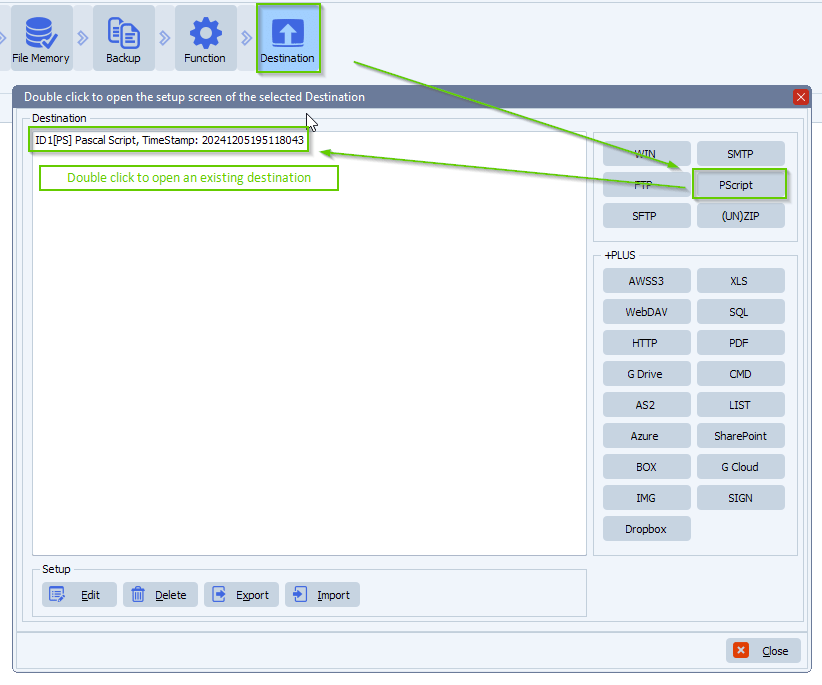
    • As Destination we used our PScript (Pascal Script) option:

    limagito filemover destination setup

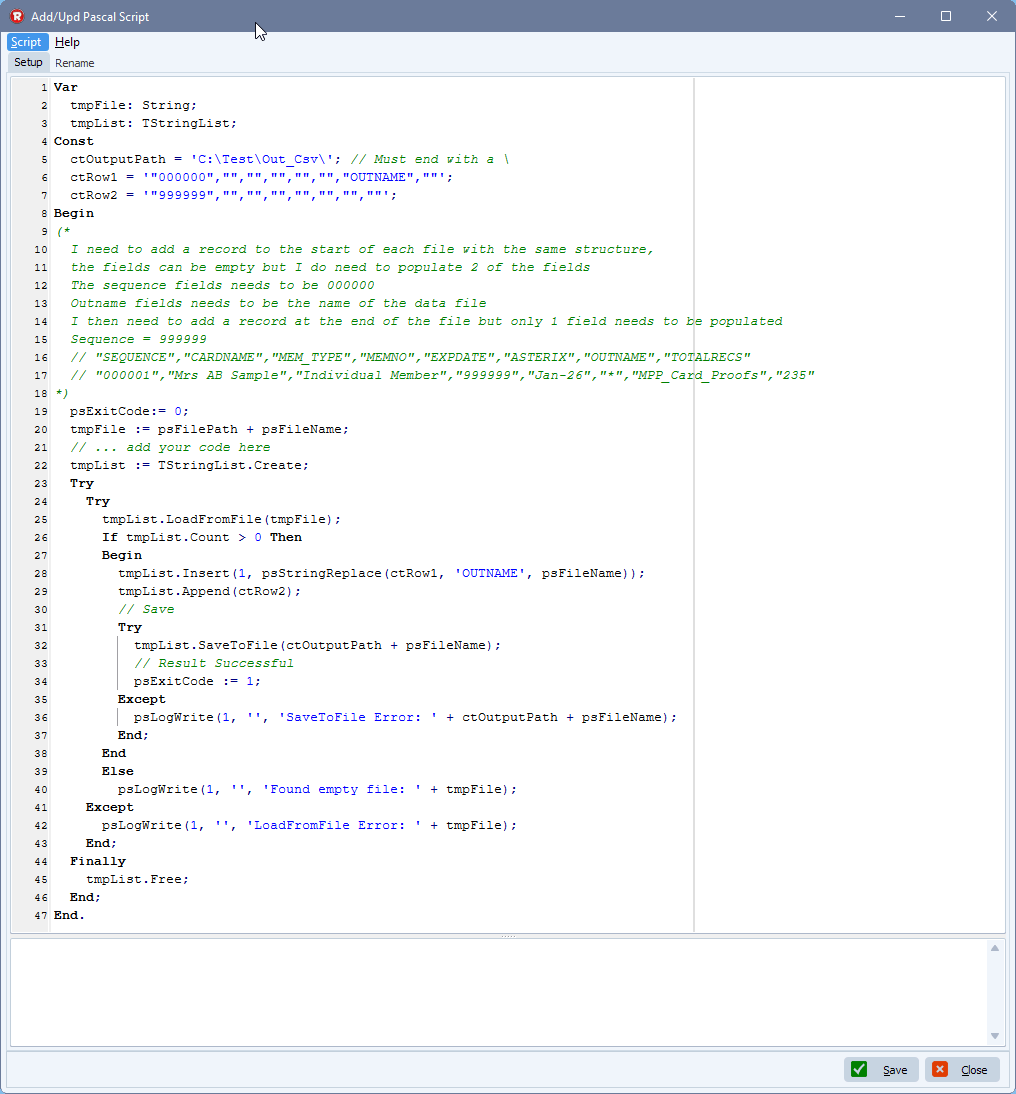
    • Please add the following Pascal Script
      • Please add the following script: link
      • Do not forget to adjust the ctOutputPath ( path must end with a \ )
        • This is the path where the adjusted csv files will be saved

    limagito file mover add a record to a csv file

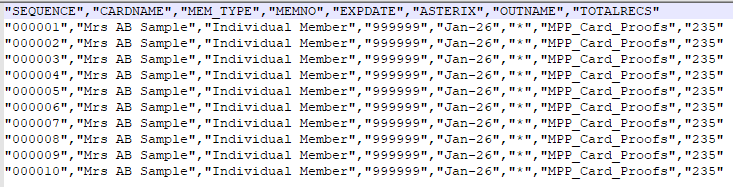
    • Example content of csv source file before changes:

    limagito filemover csv example file

    • Example content of csv destination file after changes:

    limagito file mover example csv file

    Feedback customer:

    You are an absolute legend. Thank you very much

    If you need any help with this “add a record to a csv file” question, please let us know.

    Best Regards,

    Limagito Team

    #csv #managedfiletransfer #filetransfer #filemanagement

    By Limagito-Team CSV Pascal Script ,
  • 20 Apr

    How to export all rules to CSV with column name, source and destination

    Is there a way to export all Limagito rules to CSV or Excel with the column of name, source and destination?

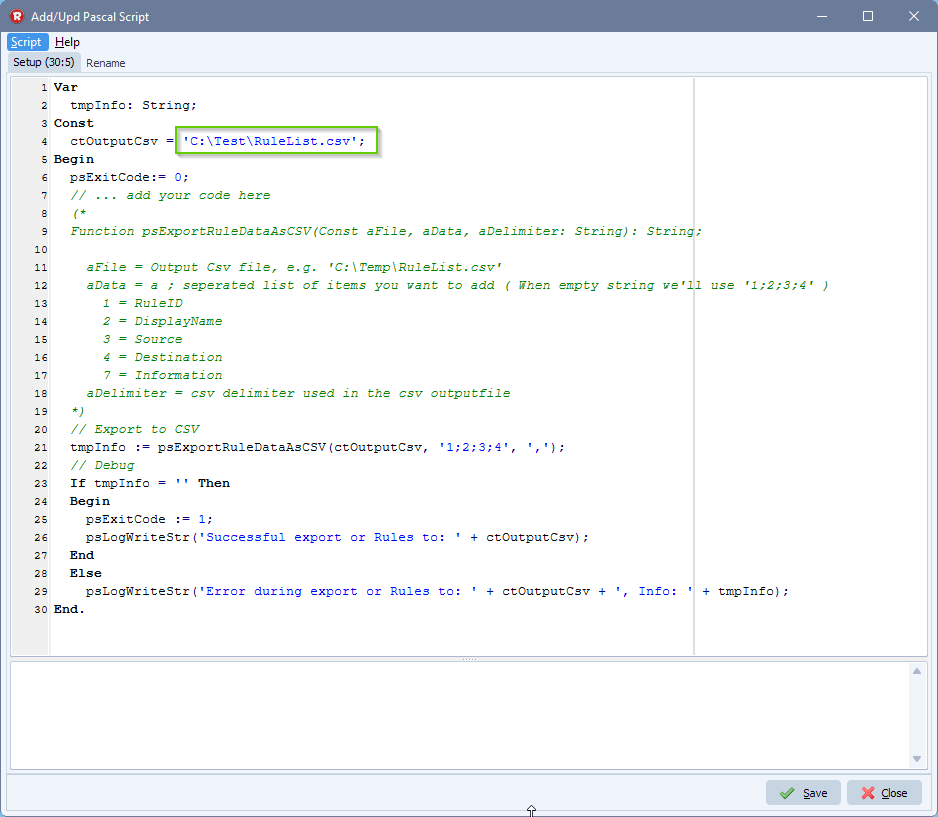
    In a recent version of Limagito File Mover we added the following Pascal Script function to achieve this:

    Function psExportRuleDataAsCSV(Const aFile, aData, aDelimiter: String): String;

    aFile = Output Csv file, e.g. ‘C:\Temp\RuleList.csv’
    aData = a ; seperated list of items you want to add ( When empty string we’ll use ‘1;2;3;4’ )
    1 = RuleID
    2 = DisplayName
    3 = Source
    4 = Destination
    5 = Rule Status (version v2024.9.7.0 and up)

    • 0 = Unknown
    • 1 = Scanning Disabled
    • 2 = Rule in Hold
    • 11 = Delete Function: Enabled
    • 12 = Delete Function: Disabled
    • 13 = Delete Function: Thread(s) Terminating
    • 14 = Delete Function: Thread(s) Running
    • 15 = Delete Function: Error as Info Status
    • 21 = Move Function: Enabled
    • 22= Move Function: Disabled
    • 23 = Move Function: Thread(s) Terminating
    • 24 = Move Function: Thread(s) Running
    • 25 = Move Function: Error as Info Status
    • 31 = Copy Function: Enabled
    • 32 = Copy Function: Disabled
    • 33 = Copy Function: Thread(s) Terminating
    • 34 = Copy Function: Thread(s) Running
    • 35 = Copy Function: Error as Info Status

    6 = GroupName (version v2024.10.15.0 and up)
    7 = Information
    8 = RuleSchedule (version v2024.10.15.0 and up)
    9 = GlobalSchedule (version v2024.10.15.0 and up)
    20 = RuleLogFile (version v2024.10.15.0 and up)
    21 = RuleLogFileName (version v2024.10.15.0 and up)
    22 = RuleLogFilePath (version v2024.10.15.0 and up)
    23 = GlobalLogFile (version v2024.10.15.0 and up)
    24 = GlobalLogFileName (version v2024.10.15.0 and up)
    25 = GlobalLogFilePath (version v2024.10.15.0 and up)
    26 = TotalFilesCounter (version v2025.11.12.0 and up)
    27 = TotalFilesSrcError (version v2025.11.12.0 and up)
    28 = TotalFileDstError (version v2025.11.12.0 and up)
    29 = TotalControlSrc (version v2025.11.12.0 and up)
    30 = TotalControlDst (version v2025.11.12.0 and up)
    31 = CurrentFilesCounter (version v2025.11.12.0 and up)
    32 = CurrentFilesSrcError (version v2025.11.12.0 and up)
    33 = CurrentFilesDstError (version v2025.11.12.0 and up)
    34 = CurrentControlSrcError (version v2025.11.12.0 and up)
    35 = CurrentControlDstError (version v2025.11.12.0 and up)


    aDelimiter = csv delimiter used in the csv outputfile


    • Setup is easy, you’ll only need to add our ‘Pascal Script’ option as Source
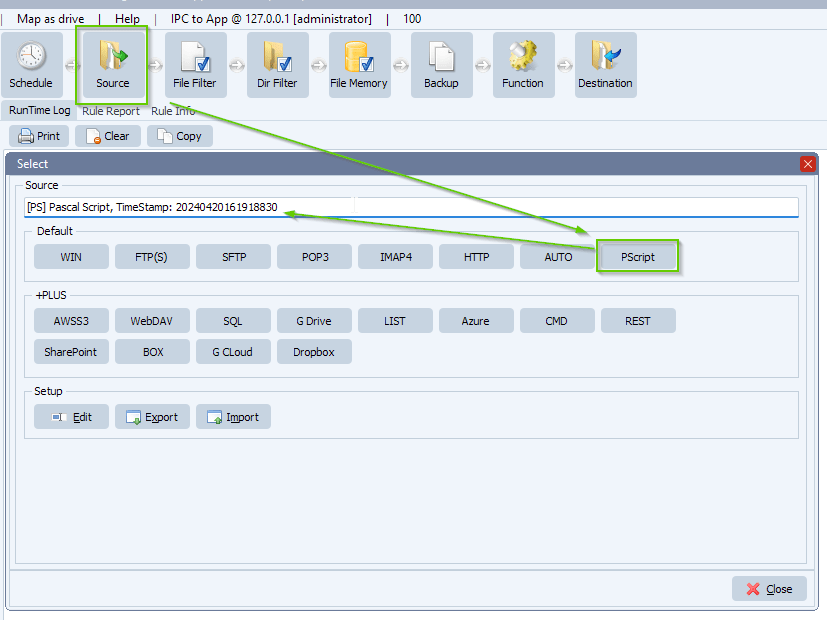
    limagito file mover pascal script as source

    • Do not forget to adjust the ‘ctOutputCsv’ const:
      • Please add the following script: link

    limagito file mover export all rules to CSV

    • This is all you need to do, just enable and trigger the Rule now
    • Output Csv file content:

    RuleID,DisplayName,Source,Destination
    1,UNZIP Files Mike,[WIN]C:\Test\Out_Zip\,ID1[ZIP]C:\Test\Out_Zip\Out\
    2,WIN > Google Cloud Storage,[WIN]C:\Test\In\,ID2[GCLOUD]storage.googleapis.com/limagito/test
    3,GCloud > WIN,[GCLOUD]storage.googleapis.com/limagito/Test,ID1[WIN]C:\Test\Out\GCloud\

    If you need any help with our new ‘export all rules to CSV’ feature, please let us know. If you need more fields, please let us know.

    Best Regards,

    Limagito Team

    #managedfiletransfer #FileManagement #filetransfer

1 2 3 4
SEARCH