Logging

  • 16 Feb

    Custom logging feature to feed a Zabbix monitoring system

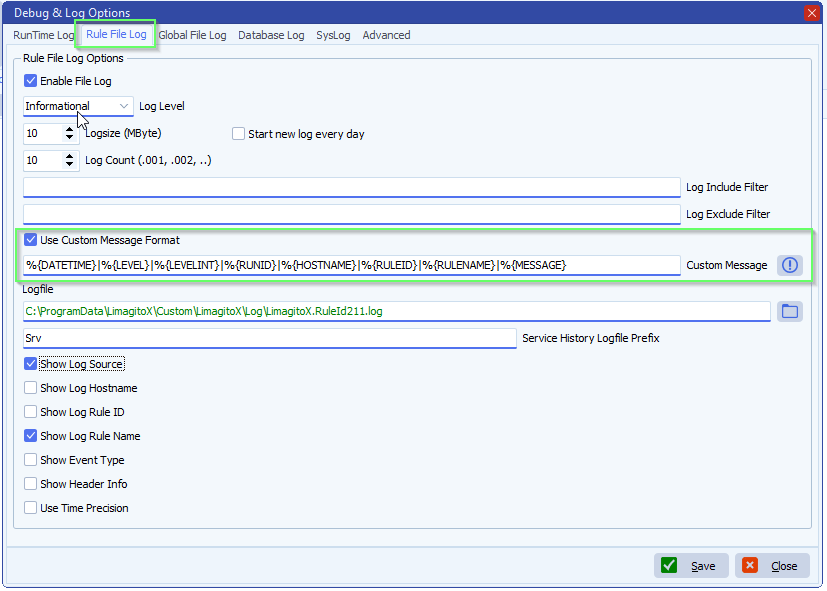
    Q: We are using LimagiTO File Mover’s custom logging feature to feed a Zabbix monitoring system. We currently use the following log format:

    %{DATETIME}|%{LEVEL}|%{LEVELINT}|%{THREADID}|%{HOSTNAME}|%{RULEID}|%{RULENAME}|%{MESSAGE}
    We are trying to determine whether a complete rule execution succeeded or failed by parsing the log. The challenge we face is that we have no reliable way to group all log lines belonging to the same execution run of a rule:
    • THREADID changes between runs, which is useful, but we observed that a single rule execution can sometimes involve multiple threads (different THREADIDs writing log entries for the same run).
    • DATETIME can span several seconds or minutes for a single execution, so timestamp alone is not sufficient.
    • There is no unique execution/run identifier in the available logging tags.
    Could a %{RUNID} tag (or equivalent) be added that would assign a unique identifier to each rule execution cycle? This would allow us to reliably group all log entries from the same run and determine whether that run completed with or without errors.
    As a secondary question: is the multi-thread behavior for a single rule execution expected? Under what circumstances does a rule execution produce log entries with different THREADIDs?
    Thank you for considering this.
    A: In version v2026.2.16.0 we added the %{RUNID} tag

    limagito file mover C:\Data\Foto\2026\feed a Zabbix monitoring system\feed a Zabbix monitoring system

    Tags:

    ********************************************************************************
    ***                  Information about the Limagito File Mover Logging Tag(s)                   ***
    ********************************************************************************

    The following predefined variables can be used to produce a custom message output format:

    APPNAME : Customizable variable (by default set as filename without extension)

    APPVERSION : Application file version

    APPPATH : Application run path

    CPUCORES : Number of CPU cores

    DATETIME : Date & time log item occurs

    ENVIRONMENT : Customizable variable (normally Production, Test, etc)

    DATE : Date log item occurs

    HOSTNAME : Computer name

    LEVEL : Level or Eventype

    LEVELINT : Level as numeric

    LOGSOURCE : Description of log source

    MESSAGE : Message sent to logger

    OSVERSION : OS version

    PLATFORM : Customizable variable (normally Desktop, Mobile, etc)

    RULEID : RuleID number

    RULENAME : RuleName

    RUNID : Unique identifier to each rule execution cycle

    THREADID : Thread ID log item set

    TIME : Time log item occurs

    USERNAME : Logged user name


    If you need any help about this ‘feed a Zabbix monitoring system’ question, please let us know.

    Best Regards,

    Limagito Team

    #zabbix #managedfiletransfer #filetransfer #filemanagement
  • 05 Oct

    How to prevent unnecessary log entries

    How to prevent unnecessary log entries

    Q: For example, Scanning a remote SFTP site to collect a specific file that seldom appears. I see the first half om the log and need to scroll down to se the last entry. I can of course change the scanning interval, but they (a department) expect to have a swift delivery as soon as a file appears. It’s no biggie.

    2025-08-14 06:00:00 SFTPCheckConnected, CK Request Path after Login: /
    2025-08-14 06:00:00 SFTPCheckConnected, CK Change Path to /
    2025-08-14 06:00:00 SFTPCheckConnected, CK Request Path after Change: /
    2025-08-14 07:00:00 SFTPCheckConnected, CK Request Path after Login: /
    2025-08-14 07:00:00 SFTPCheckConnected, CK Change Path to /
    2025-08-14 07:00:00 SFTPCheckConnected, CK Request Path after Change: /
    2025-08-14 08:00:00 SFTPCheckConnected, CK Request Path after Login: /
    2025-08-14 08:00:00 SFTPCheckConnected, CK Change Path to /
    2025-08-14 08:00:00 SFTPCheckConnected, CK Request Path after Change: /
    2025-08-14 09:00:00 SFTPCheckConnected, CK Request Path after Login: /
    2025-08-14 09:00:00 SFTPCheckConnected, CK Change Path to /
    2025-08-14 09:00:00 SFTPCheckConnected, CK Request Path after Change: /
    2025-08-14 10:00:00 SFTPCheckConnected, CK Request Path after Login: /
    2025-08-14 10:00:00 SFTPCheckConnected, CK Change Path to /
    2025-08-14 10:00:00 SFTPCheckConnected, CK Request Path after Change: /
    2025-08-14 11:00:00 SFTPCheckConnected, CK Request Path after Login: /
    2025-08-14 11:00:00 SFTPCheckConnected, CK Change Path to /
    2025-08-14 11:00:01 SFTPCheckConnected, CK Request Path after Change: /
    and so on…

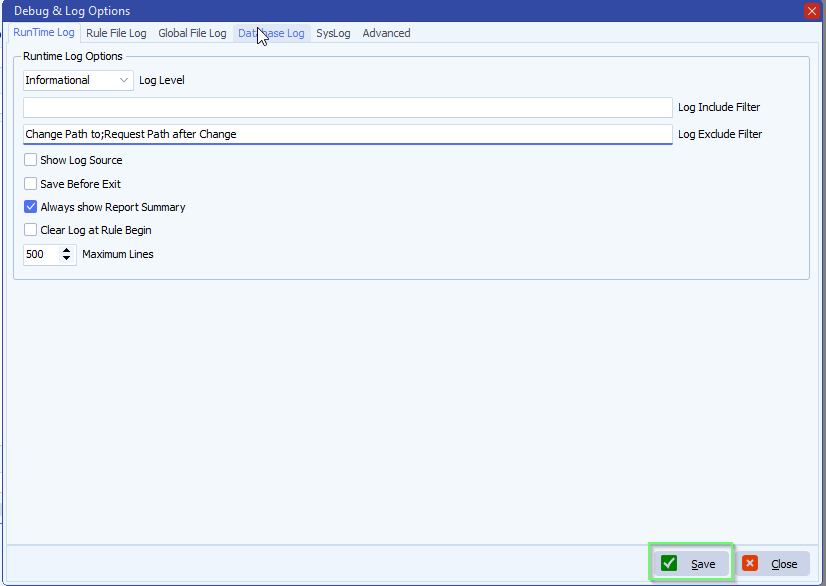
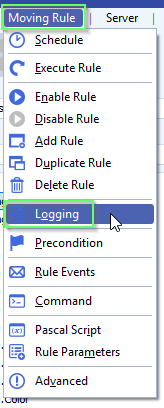
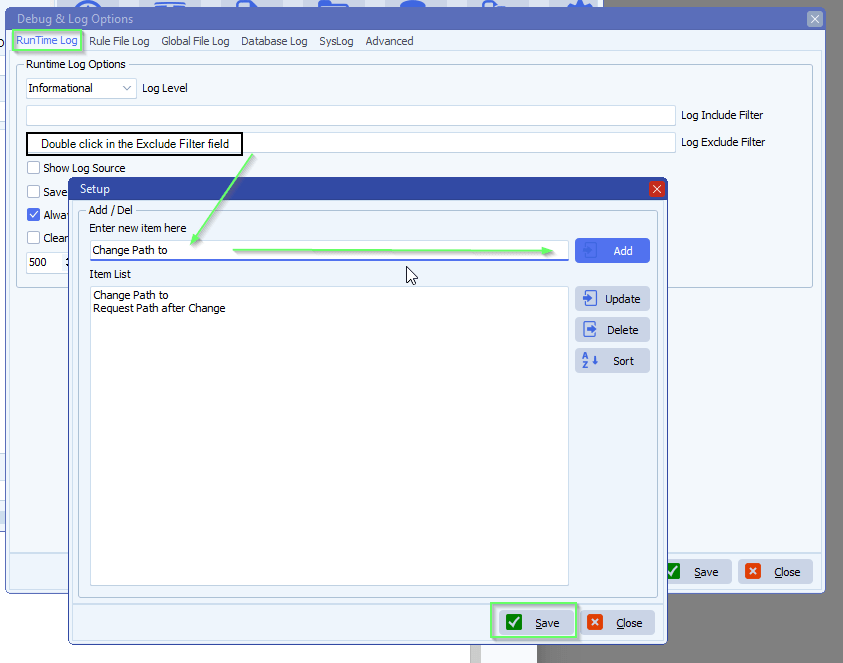
    A: Yes, you can exclude these entries if you want:

    limagito file mover logging option

    • Double click on the ‘Log Exclude Filter’

    limagito file mover unnecessary log entries

    limagito file mover unnecessary log entries

    Feeback customer:

    Just want to give kudos for your support. Among the absolute best I’v encountered!

    If you need any help about this ‘unnecessary log entries’ request, please let us know.

    Best Regards,

    Limagito Team

    #managedfiletransfer #filetransfer #filemanagement
  • 10 Aug

    How to log configuration changes to a file

    How to log configuration changes to a file

    Q: I would like to have it record for each rule when was the last time it was edited and who edited it.

    A: In version v2025.8.10.0 we added an option to log configuration changes to a file. It is available for Site+ and Corporate+ license holders.

    • Global menu item > Global Config Log

    limagito file mover log configuration changes

    • Log Level option:
      • Error: only error infomration will be added to the log
      • Info: will add information to the log when <Save> button was used, even when no settings were changed
      • Enhanced: will add information to the log when <Save> button was used, only when settings were changed
      • Debug: will add the changes as JSON to the log, only when settings were changed > added in v2025.8.16.0

    limagito file mover log configuration changes

    In version v2025.8.16.0 we added the possibility to log configuration changes as JSON to the log file.

    • Set the Log Level to “Debug”

    limagito file mover log configuration changes

    • We changed the Address in the SFTP Destination of RuleID 106 named “Image and sidecar xml”, logged on to Limagito File Mover as “administrator”
    • Result in the log file:

    limagito file mover global change configuration log file

    If you need any help with this new option, please let us know.

    Best Regards,

    Limagito Team

    #managedfiletransfer #filetransfer #filemanagement
1 2 3 4 7
SEARCH