Zabbix

  • 16 Feb

    Custom logging feature to feed a Zabbix monitoring system

    Q: We are using LimagiTO File Mover’s custom logging feature to feed a Zabbix monitoring system. We currently use the following log format:

    %{DATETIME}|%{LEVEL}|%{LEVELINT}|%{THREADID}|%{HOSTNAME}|%{RULEID}|%{RULENAME}|%{MESSAGE}
    We are trying to determine whether a complete rule execution succeeded or failed by parsing the log. The challenge we face is that we have no reliable way to group all log lines belonging to the same execution run of a rule:
    • THREADID changes between runs, which is useful, but we observed that a single rule execution can sometimes involve multiple threads (different THREADIDs writing log entries for the same run).
    • DATETIME can span several seconds or minutes for a single execution, so timestamp alone is not sufficient.
    • There is no unique execution/run identifier in the available logging tags.
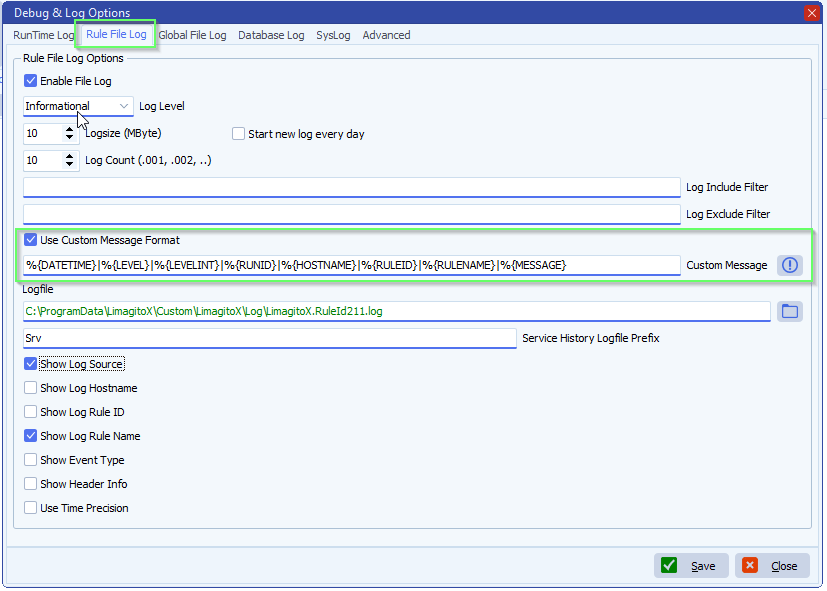
    Could a %{RUNID} tag (or equivalent) be added that would assign a unique identifier to each rule execution cycle? This would allow us to reliably group all log entries from the same run and determine whether that run completed with or without errors.
    As a secondary question: is the multi-thread behavior for a single rule execution expected? Under what circumstances does a rule execution produce log entries with different THREADIDs?
    Thank you for considering this.
    A: In version v2026.2.16.0 we added the %{RUNID} tag

    limagito file mover C:\Data\Foto\2026\feed a Zabbix monitoring system\feed a Zabbix monitoring system

    Tags:

    ********************************************************************************
    ***                  Information about the Limagito File Mover Logging Tag(s)                   ***
    ********************************************************************************

    The following predefined variables can be used to produce a custom message output format:

    APPNAME : Customizable variable (by default set as filename without extension)

    APPVERSION : Application file version

    APPPATH : Application run path

    CPUCORES : Number of CPU cores

    DATETIME : Date & time log item occurs

    ENVIRONMENT : Customizable variable (normally Production, Test, etc)

    DATE : Date log item occurs

    HOSTNAME : Computer name

    LEVEL : Level or Eventype

    LEVELINT : Level as numeric

    LOGSOURCE : Description of log source

    MESSAGE : Message sent to logger

    OSVERSION : OS version

    PLATFORM : Customizable variable (normally Desktop, Mobile, etc)

    RULEID : RuleID number

    RULENAME : RuleName

    RUNID : Unique identifier to each rule execution cycle

    THREADID : Thread ID log item set

    TIME : Time log item occurs

    USERNAME : Logged user name


    If you need any help about this ‘feed a Zabbix monitoring system’ question, please let us know.

    Best Regards,

    Limagito Team

    #zabbix #managedfiletransfer #filetransfer #filemanagement
  • 23 Oct

    How do I use Zabbix to monitor the status of my tasks

    Q: How do I use Zabbix to monitor the status of my tasks.

    What: We are looking to monitor some of our Limagito tasks inside Zabbix using the rule event in Limagito.

    Why: Example, we have an SLA for a specific service, we monitor the hardware services etc in Zabbix

    Some of those services depends on file being moved by LIMAGITO.

    How: I need to execute a CMD with parameter on event success and on event fail so I can communicate to my Zabbix server.

    Could you give me some assistance as to how I can run an .exe with parameters whenever a task is successful/unsuccessful?

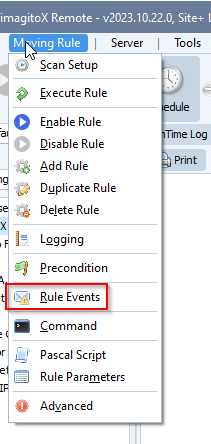
    A: In version v2023.10.23.0 we added our ‘Command Line’ option to the Rule Events. This should make it possible to use any Command Line tool like the one from Zabbix (zabbix_sender.exe).
    limagito file mover rule events
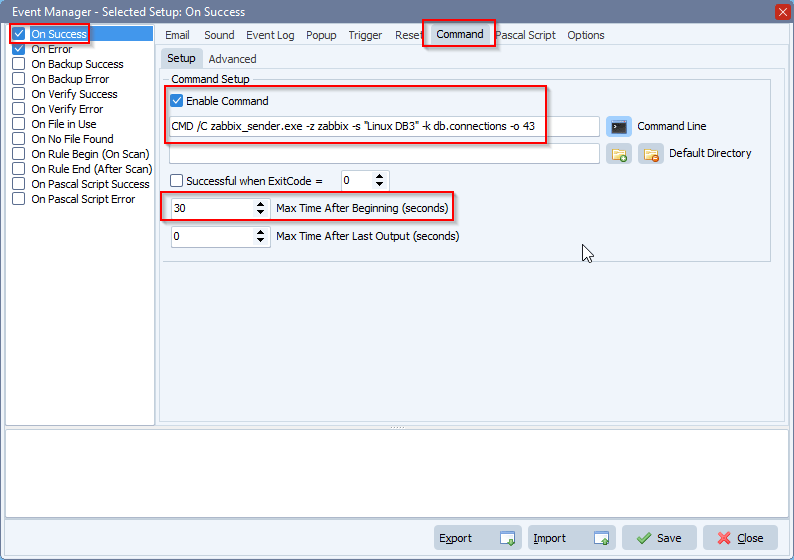
    Example for the ‘On Success’ event. We have no idea about the zabbix_sender Command Line tool parameters, this is just an example from their website.
    You’ll need to enable the ‘On Error’ event too and add the Command Setup for this event also (with other zabbix_sender parameters).
    We have set the ‘Max Time After Beginning’ to 30 seconds. This prevents the command from hanging in case there is an issue with the command Line tool.
    limagito file mover use Zabbix to monitor the status
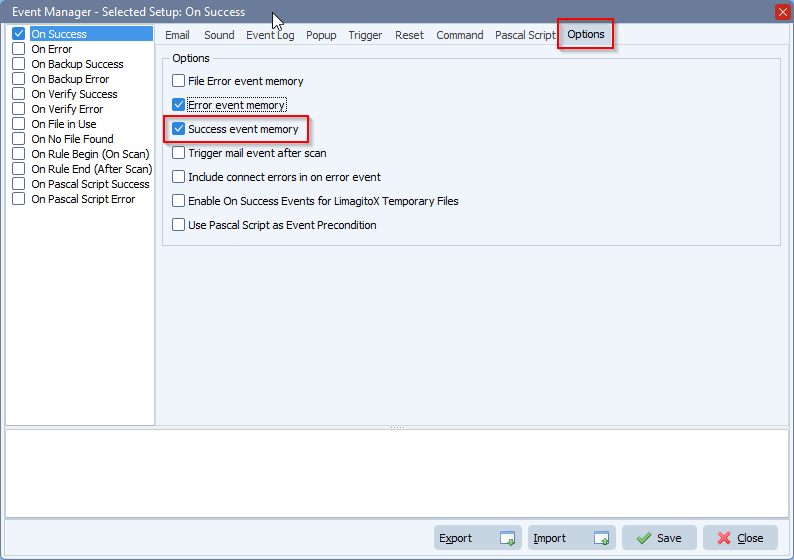
    Maybe it is a good idea to enable ‘Success event memory’ and ‘Error event Memory’. This way the event will only be triggered when the status changes between Success  <> Error and not with every Success and Error event.
    limagito file mover rule events setup

    #zabbix #cmd #filetransfer #filemanagement

    If you need any help with this ‘use Zabbix to monitor the status’ request, please let us know.

    Best Regards,

    Limagito Team

    By Limagito-Team Command Events , ,
SEARCH