day

  • 06 Apr

    How to use day of the week folders based on the filename

    Using day of the week folders

    Q: I would like to sort my files based on the filename. The first 8 char contain the date that has to be used. The format is YYYYMMDD (Year = 4 char, Month = 2 char and Day 2 = char).

    A: This is possible using our Pascal Script option. We’ve attached some screenshots to get you started.

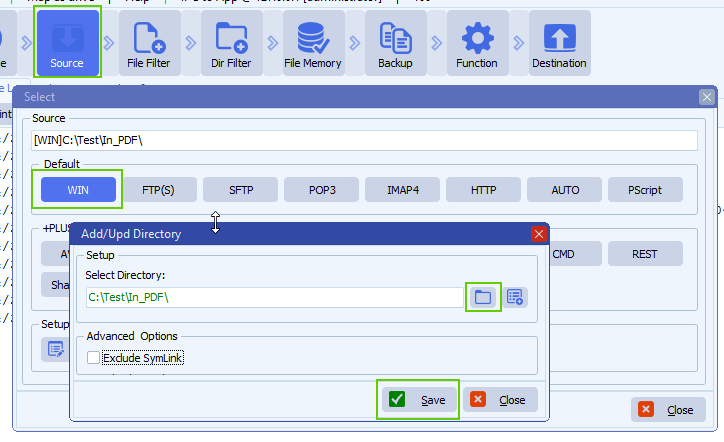
    • We used a Windows folder as Source:

    limagito file mover windows folder as source

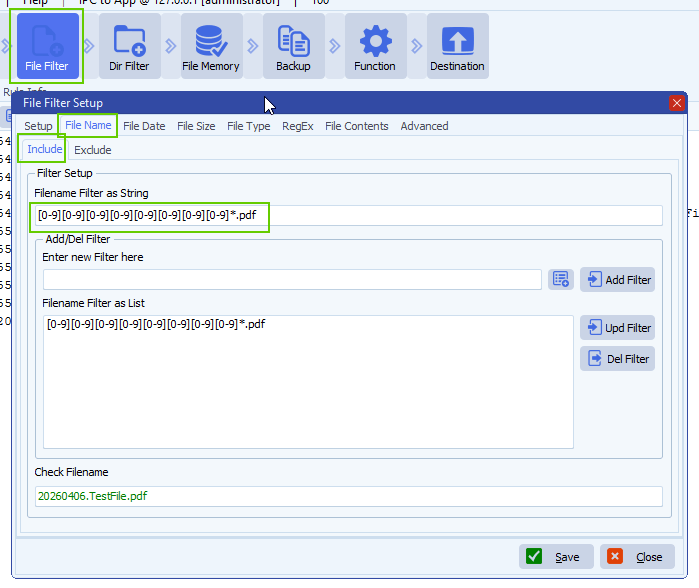
    • File Filter Setup:

    limagito file mover filename include filter

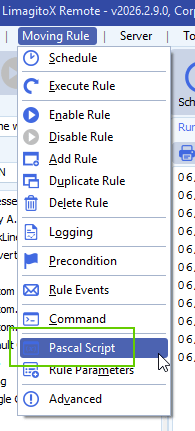
    • Open our Pascal Script option:

    limagito file mover pascal script option

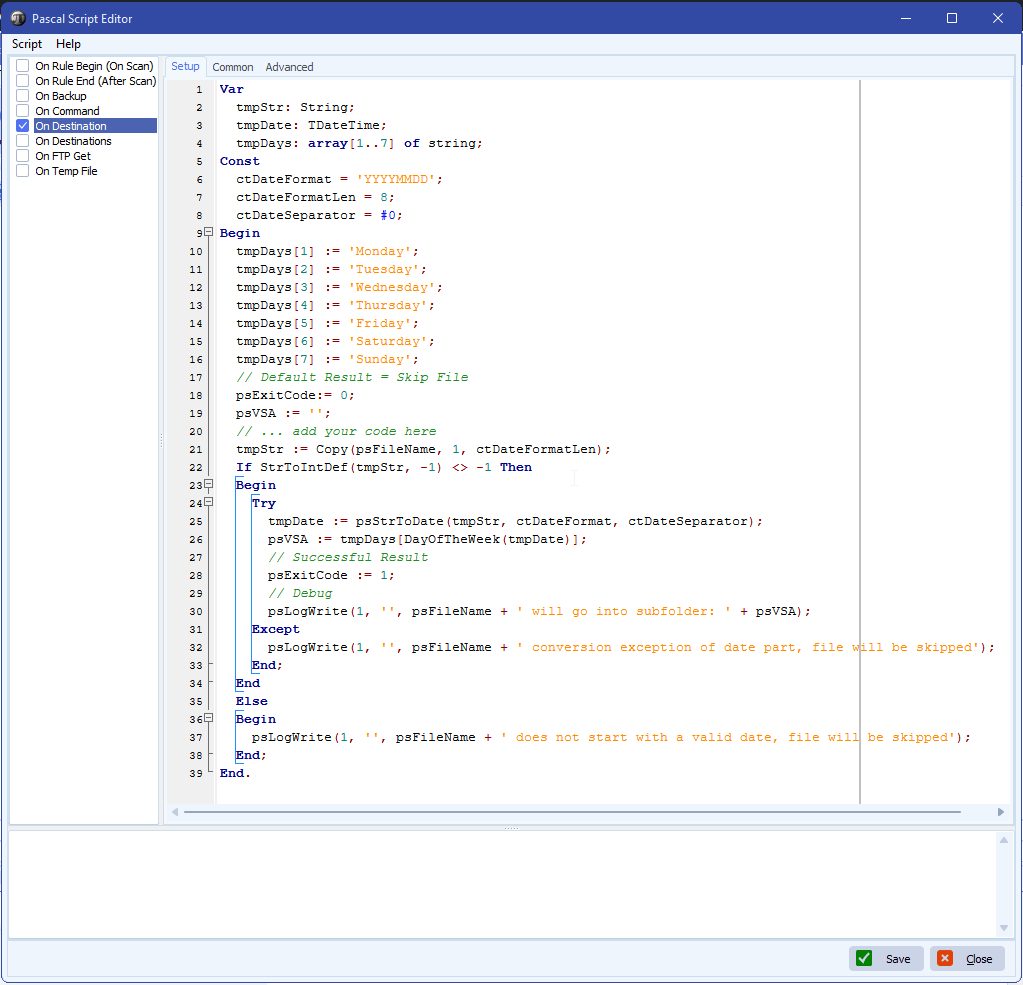
    • Enable and add the following ‘On Destination’ script:
      • The script will strip the date part from the filename and will check the day of the week
        • Corresponding day of the week will go into the %VSA (Var String A) parameter which will be used in the Destination setup
    Var
      tmpStr: String;
      tmpDate: TDateTime;
      tmpDays: array[1..7] of string;
    Const
      ctDateFormat = 'YYYYMMDD';
      ctDateFormatLen = 8;
      ctDateSeparator = #0;
    Begin
      tmpDays[1] := 'Monday';
      tmpDays[2] := 'Tuesday';
      tmpDays[3] := 'Wednesday';
      tmpDays[4] := 'Thursday';
      tmpDays[5] := 'Friday';
      tmpDays[6] := 'Saturday';
      tmpDays[7] := 'Sunday';
      // Default Result = Skip File
      psExitCode:= 0;
      psVSA := '';
      // ... add your code here
      tmpStr := Copy(psFileName, 1, ctDateFormatLen);
      If StrToIntDef(tmpStr, -1) <> -1 Then
      Begin
        Try
          tmpDate := psStrToDate(tmpStr, ctDateFormat, ctDateSeparator);
          psVSA := tmpDays[DayOfTheWeek(tmpDate)];
          // Successful Result
          psExitCode := 1;
          // Debug
          psLogWrite(1, '', psFileName + ' will go into subfolder: ' + psVSA);
        Except
          psLogWrite(1, '', psFileName + ' conversion exception of date part, file will be skipped');    
        End;
      End
      Else
      Begin
        psLogWrite(1, '', psFileName + ' does not start with a valid date, file will be skipped');
      End;
    End.
    limagito file mover day of the week folders

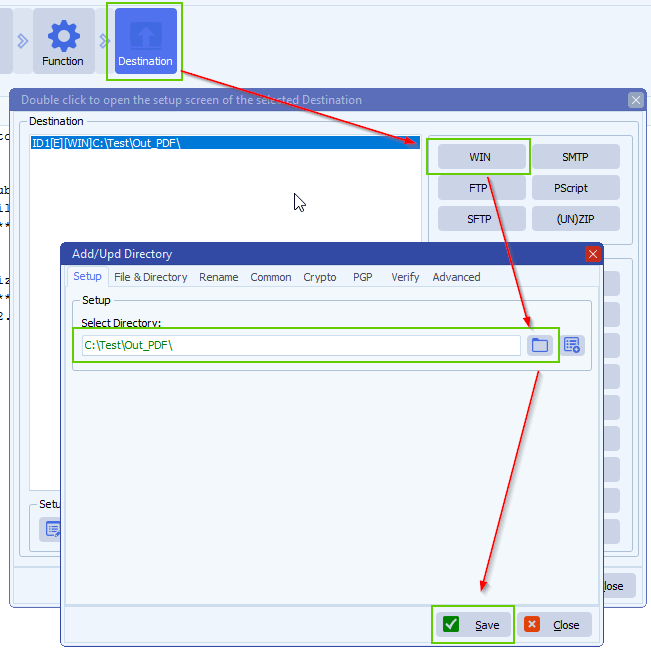
    • Destination Setup:

    limagito file mover windows folder as destination

    • Important, adjust the default ‘Create Subdir option’, add %VSA (%VSA contains the day of the week):
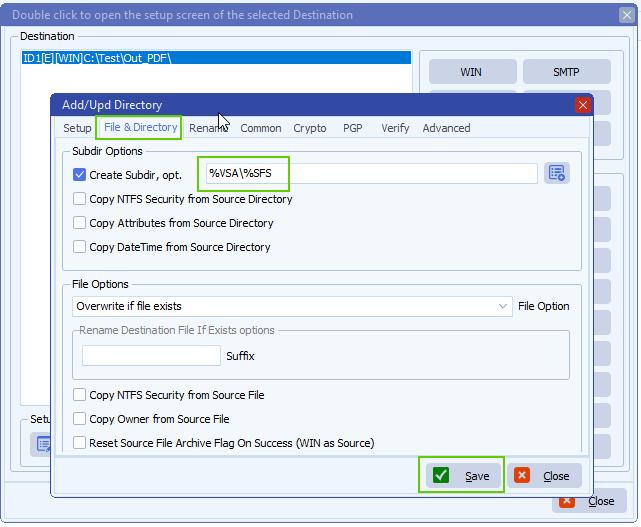
    limagito file mover day of the week folders

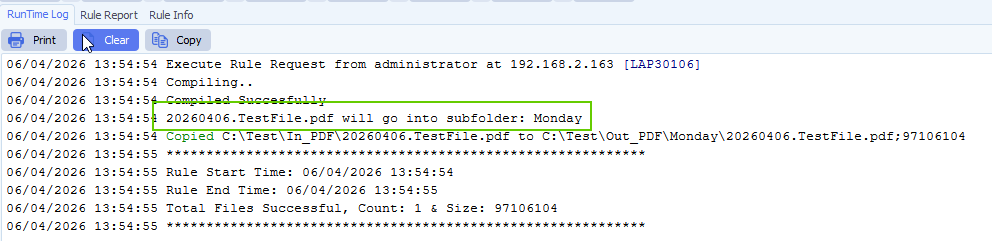
    • RunTime Log Result:

    limagito file mover runtime log

    If you need any help about this ‘day of the week folders’ option, please let us know.

    Best Regards,

    Limagito Team

    #managedfiletransfer #filetransfer #filemanagement #limagito
  • 28 Apr

    Q&A 2: Is it possible to rename a file that has a date in the filename to also include the day of the week?

    Q: Is it possible in LimagitoX File Mover to rename a file that has a date in the filename to also include the day of the week?
    Here is an example of what I would like to rename.
    Original Filename: XYZ001D_04_21_20_ABCD.pdf
    (04_21_20 = April 21, 2020)
    Rename To:  Tues_XYZ001D_04_21_20_ABCD.pdf

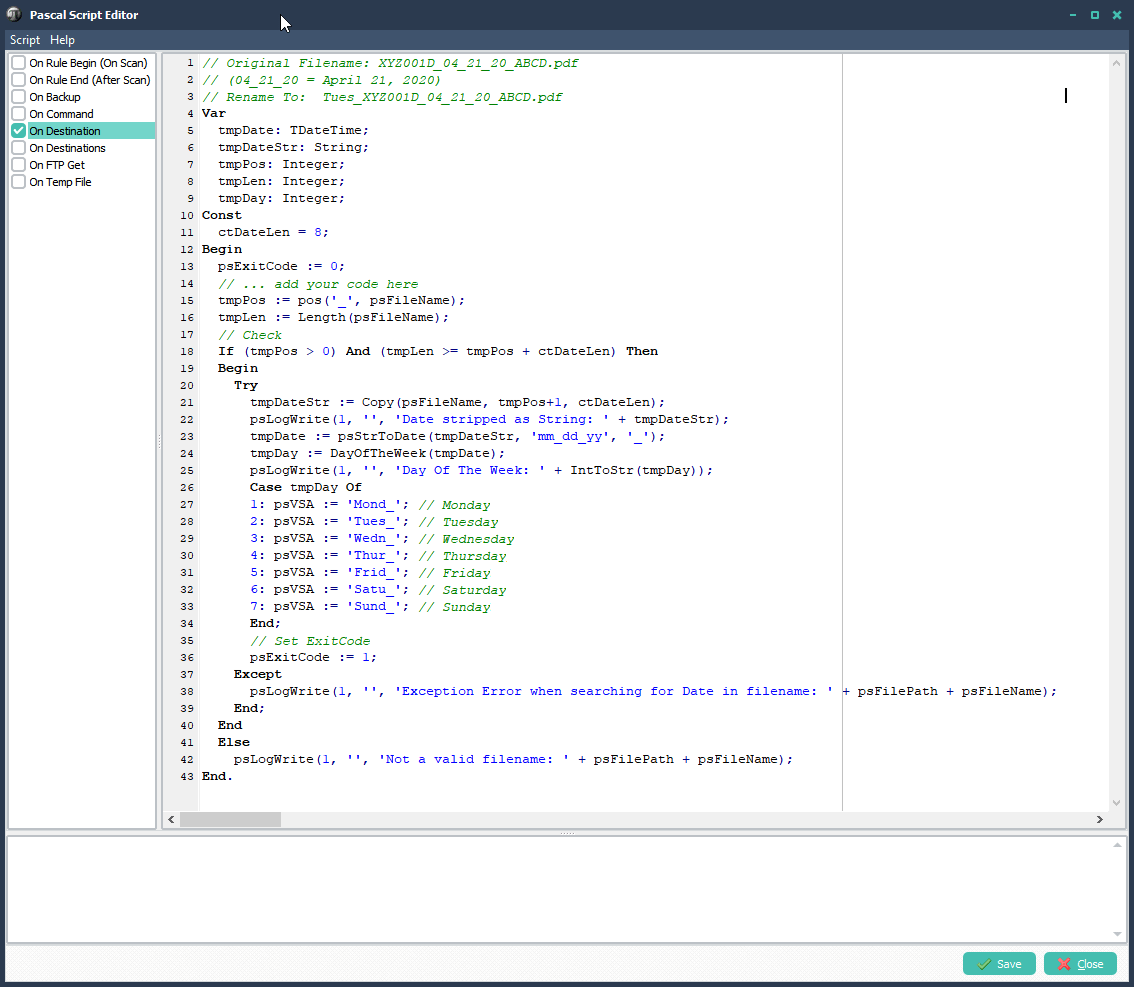
    A: Yes this is possible using Pascal Script. Some screenshots to get you started.
    Add The Following ‘On Destination’ Pascal Script:

    // Original Filename: XYZ001D_04_21_20_ABCD.pdf
    // (04_21_20 = April 21, 2020)
    // Rename To:  Tues_XYZ001D_04_21_20_ABCD.pdf
    Var
      tmpDate: TDateTime;
      tmpDateStr: String;
      tmpPos: Integer;
      tmpLen: Integer;
      tmpDay: Integer;
    Const
      ctDateLen = 8;  
    Begin
      psExitCode := 0;
      // ... add your code here
      tmpPos := pos('_', psFileName);
      tmpLen := Length(psFileName);
      // Check
      If (tmpPos = 0) And (tmpLen = tmpPos + ctDateLen) Then
      Begin
        Try
          tmpDateStr := Copy(psFileName, tmpPos+1, ctDateLen);
          psLogWrite(1, '', 'Date stripped as String: ' + tmpDateStr);
          tmpDate := psStrToDate(tmpDateStr, 'mm_dd_yy', '_');      
          tmpDay := DayOfTheWeek(tmpDate);
          psLogWrite(1, '', 'Day Of The Week: ' + IntToStr(tmpDay));
          Case tmpDay Of
          1: psVSA := 'Mond_'; // Monday
          2: psVSA := 'Tues_'; // Tuesday
          3: psVSA := 'Wedn_'; // Wednesday
          4: psVSA := 'Thur_'; // Thursday
          5: psVSA := 'Frid_'; // Friday
          6: psVSA := 'Satu_'; // Saturday
          7: psVSA := 'Sund_'; // Sunday
          End;
          // Set ExitCode
          psExitCode := 1;
        Except
          psLogWrite(1, '', 'Exception Error when searching for Date in filename: ' + psFilePath + psFileName);     
        End;
      End
      Else
        psLogWrite(1, '', 'Not a valid filename: ' + psFilePath + psFileName);  
    End.

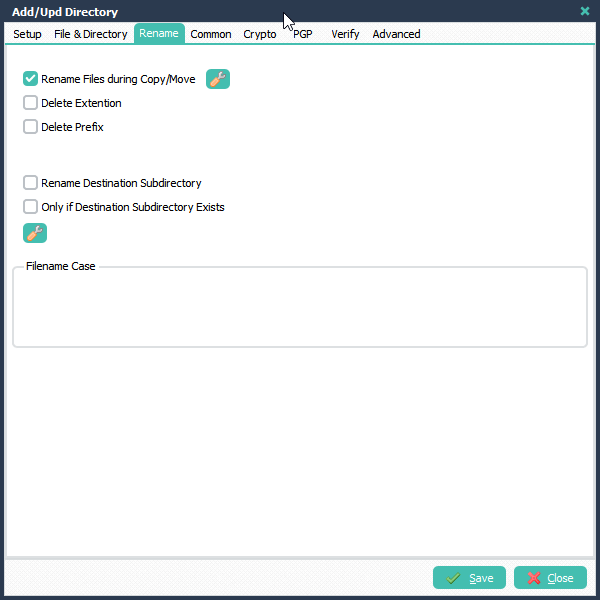
    In your Destination Setup select the ‘Rename’ Tab. Enable ‘Rename Files during Copy/Move and click the button next to this option.

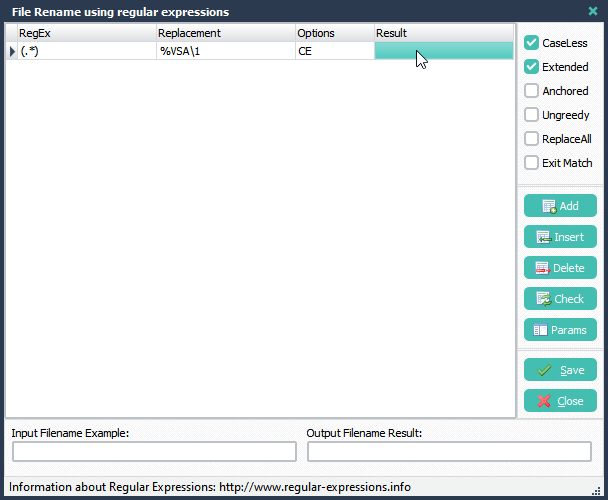
    File Rename Setup:
    RegEx:                (.*)
    Replacement:    %VSA\1

    The goal of this renaming is to add the %VSA var in front of the filename. The %VSA var was previously set in the Pascal Script.
    The \1 corresponds with the RegEx (.*) which is in this case the complete filename.

    If you need help, please let us know. Don’t hesitate to ask.

    Regards,
    Limagito Team

    By Limagito-Team Q&A ,
SEARCH